Twizzlo is an all-in-one small business booking software that offers unlimited staff, locations, and no per-seat fees for a flat $29.99.
Twizzlo has entered the crowded field of appointment scheduling software with a straightforward pitch: pay one flat rate per business, not per seat. For small service businesses like barbershops, salons, and med spas, the promise of unlimited staff, unlimited locations, and every feature unlocked from day one is a direct challenge to established players like Fresha, Booksy, and Vagaro, which often tier their pricing by headcount or charge for premium modules. The software consolidates online booking, client management, automated reminders, payment processing, and analytics into a single dashboard. This review takes a close look at what Twizzlo actually offers, how it compares to alternatives, and whether the flat-rate model is as good as it sounds for a growing practice. Twizzlo's features page lists everything in detail, but the core capabilities are highlighted below.
What is Twizzlo?
Twizzlo is a cloud-based appointment scheduling and business management platform designed specifically for small service businesses, including barbershops, hair salons, tattoo studios, day spas, nail salons, massage therapists, personal trainers, yoga studios, pet groomers, dog trainers, cleaning services, auto detailers, photographers, med spas, lash and brow studios, private chefs, tutors, and therapists. The platform combines four essential tools: an online booking engine that runs 24/7, a client relationship manager that tracks every visit and client preference, a staff scheduling calendar with drag-and-drop functionality, and a business intelligence dashboard that surfaces revenue, utilization, and satisfaction metrics. The defining characteristic is the pricing model. Instead of the industry norm of charging per staff member or per location, Twizzlo charges a flat $29.99 per month for the entire business (or $0 for a capped free plan). This means a salon with two stylists pays the same as one with twenty stylists, and a business with multiple locations does not incur additional fees. The company calls this the "Twizzlo promise": no per-seat fees, no per-location fees, no paid modules to unlock, no forced upgrades, and every new feature shipped to all plans. In a market where pricing is often opaque and requires sales calls, Twizzlo's published rates and straightforward terms are a refreshing change. The platform is built for owners who want to stop juggling multiple tools, and it is designed to be live within 15 minutes of signup.
Key Features
Twizzlo packs a large amount of functionality into its two plans. While the feature set is expansive, the most impactful capabilities are the following.
Unlimited Staff and Locations at No Extra Cost
This is the core differentiator. Most scheduling software prices each additional employee or location as an add-on, which can create a financial penalty for growth. Twizzlo includes unlimited staff and unlimited locations even on its free plan. The platform supports per-staff calendars, individual schedules, role-based access, and multi-location booking links. For example, a nail salon with three branches can manage all locations from one dashboard, assign shifts across borders, and generate consolidated reports. The absence of per-seat charges removes the penalty for hiring or expanding, which is a significant relief for owners who have been throttled by their previous software. The system also handles multi-location shifts, meaning a staff member can work at two different branches without creating duplicate profiles.
24/7 Online Booking with Real-Time Availability
Every Twizzlo account gets a customizable public booking page that reflects live staff availability. Clients can book from any device, and the system supports recurring appointments, buffer times, and the ability to block time in one click. The booking page is designed to act as the business's after-hours front desk, capturing appointments that would otherwise require phone calls or direct messages. The page enforces cancellation policies at the time of booking, which helps set expectations and reduce no-shows. Businesses can also create multiple booking pages for different locations or services, and each page maintains its own availability rules.
Automated SMS and Email Reminders
To combat no-shows, Twizzlo automatically sends confirmations and reminders via SMS and email. Paid plans include SMS, with 50 free messages per month and additional messages billed at $0.03 each, while free plans rely on email reminders. The system integrates cancellation policies into the booking flow, allowing businesses to require notice before appointments. For high-value slots, the deposit feature (described below) adds an additional layer of protection. Reminders are sent based on the appointment time and can be customized per business. The combination of reminders and deposits is a proven approach to reducing missed appointments.
Client CRM with Lifetime Spend Tracking
Twizzlo automatically builds a profile for every client who books, whether they book online or are added manually. This profile stores visit history, notes, allergies, preferences, color formulas, and lifetime spend. Staff can search the CRM and pull up relevant details before an appointment, which is invaluable during high-touch services like hair coloring or tattoo consultations. The system also tracks tips and deposits, giving a complete financial picture of each client relationship. For service providers who rely on personalization, this eliminates the need for a separate CRM tool. The CRM is not capped on any plan, so even free users get unlimited client profiles.
Payments, Deposits, and Tips via Stripe
The platform integrates Stripe Connect for online payment processing. Businesses can collect deposits at the time of booking, which is ideal for high-demand slots like tattoo sessions or injectable appointments. Tips can also be collected at booking or after the service, and are automatically deposited to staff accounts. This feature is available on both free and paid plans, which is unusual; many competitors reserve payment processing for higher tiers. The integration supports prepaid bookings, meaning a client can pay for the entire service upfront, which locks in revenue and reduces no-shows. The dashboard shows all payment activity, including tips, deposits, and refunds.
Real-Time Insights and Occupancy Metrics
The dashboard is designed to provide a pulse of the business immediately upon login. It displays today's revenue, bookings, customer satisfaction ratings, staff utilization, and a next-hour view. The metrics are updated in real time and are not gated behind a premium analytics module. Owners can see which staff members are overbooked and which have gaps, allowing them to make adjustments on the fly. The insights also filter by location, which makes multi-location oversight easier. For a manager who wants a quick answer to "how is the day looking?", Twizzlo delivers that in the first screen.
Drag-and-Drop Calendar
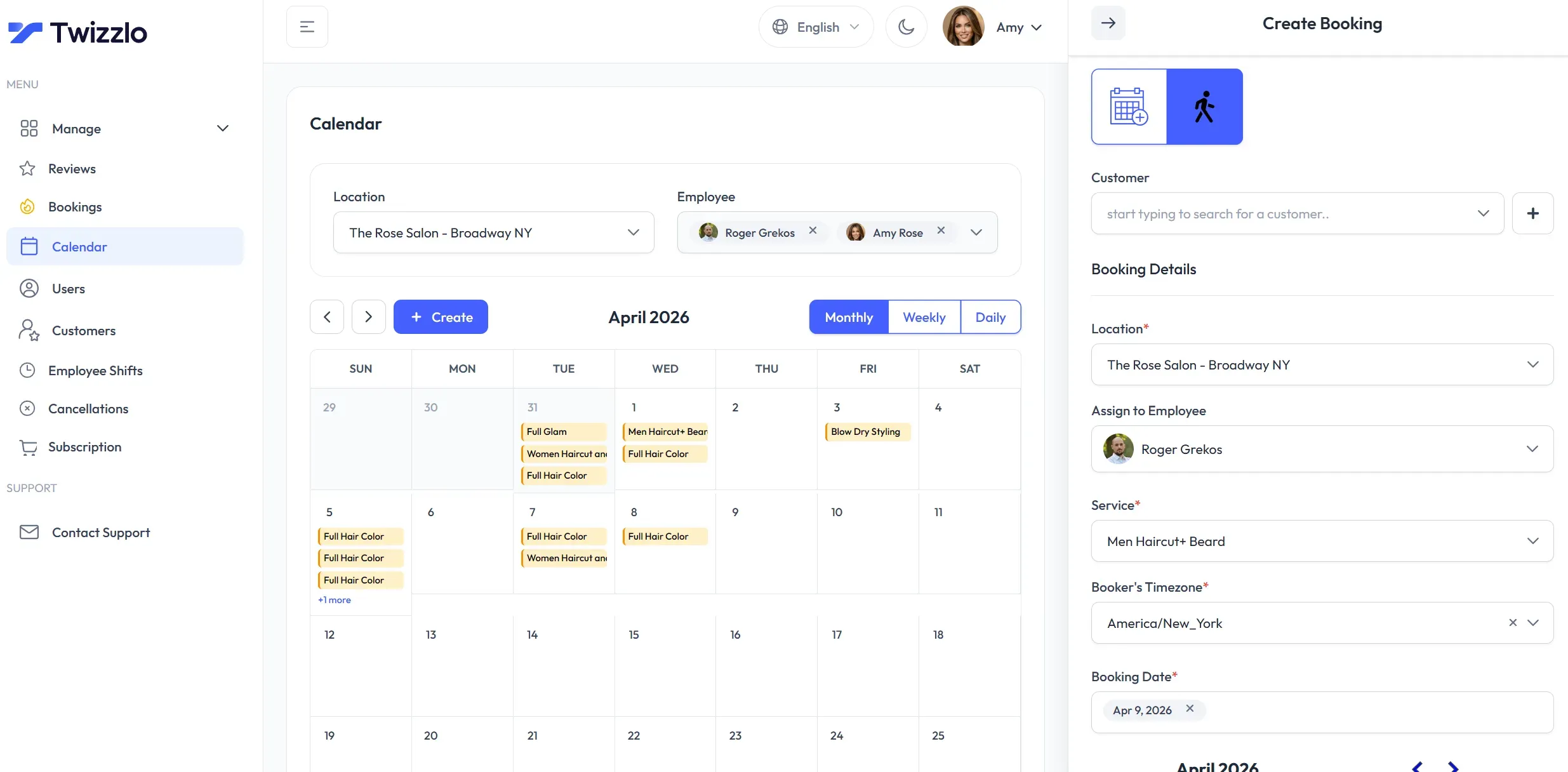
Beyond the core features, the calendar is a standout. It supports monthly, weekly, and daily views, with drag-and-drop rescheduling that feels intuitive. Per-staff availability and shifts can be set individually, and recurring appointments are handled without duplicating entries. Users can filter by location, and block time in one click. The calendar is designed for high-volume scheduling environments where speed matters. The interface is clean, with color coding for different staff or services, and it is fast enough for daily use.
Security and GDPR-Friendly Design
Twizzlo emphasizes that data is encrypted at rest and in transit, and the platform is GDPR-friendly. For businesses in the EU or those that handle sensitive client data, this is an important consideration. The site does not go into deep detail on compliance, but the commitment to GDPR is a good sign for a modern SaaS product.
How Twizzlo Compares to Other Booking Platforms
The scheduling software landscape is dominated by a few big names: Fresha, Booksy, Vagaro, Setmore, Square Appointments, and Acuity. Each has its own pricing model, but most charge per staff member or per location, or they limit features to premium tiers. Fresha is popular because it offers a free plan, but it makes money through add-ons like card processing and marketing tools. Booksy has a free plan for consumers but charges businesses for premium features, and it also charges a per-location fee for multi-location management. Setmore offers a free plan with limits on the number of active staff, and its paid plans still cap the number of staff. Vagaro has multiple tiers, and the more staff, the more you pay. Square Appointments is competitive but has a per-location fee and requires a Square account for payments. Acuity is more expensive, starting at $16 per month, and it charges for extra calendars.
Twizzlo's value proposition is that it does none of that. It is the only major player that includes unlimited staff and locations on a $29.99 plan, and even its free plan has unlimited staff and locations (with a booking cap). This makes it particularly attractive for businesses that are growing or have complex multi-location needs. However, Twizzlo is newer and has a smaller ecosystem. It does not have a native mobile app, and it does not list integrations beyond Stripe. It also does not offer video conferencing or class packages, which some competitors provide. The company does maintain detailed comparison pages that break down how it stacks up against Fresha, Booksy, and others, which is helpful for decision-making.
For a business that needs a simple, reliable booking system, Twizzlo's trade-off is acceptable. For one that requires advanced features like online class booking, membership management, or a native iOS app, Twizzlo might not yet be the best fit.
How It Works
Getting started with Twizzlo follows a familiar SaaS onboarding path, but one that is streamlined to get a business live quickly. The signup flow is available at dashboard.twizzlo.com, and the site emphasizes that no credit card is required for the free plan. After creating an account with an email and password, the owner is prompted to set up a business profile, which includes the business name, address, and default time zone. The next step is to add staff members. Each staff member can have their own schedule, service menu, and booking rules. The owner defines services with durations, prices, and any required deposits. For example, a barbershop might create services like "Haircut" (30 minutes, $35) and "Fade" (45 minutes, $45). Each staff member can be assigned different services, and the system respects individual availability.
Next, the owner configures the public booking page. Twizzlo generates a unique booking link that can be shared with clients via website, social media, or QR code. The booking page displays real-time availability based on the staff schedules, and clients can select a service, choose a provider, pick a time, and in many cases pay a deposit online. The owner can customize the booking page with a logo, colors, and a brief description. After the first booking is placed, the appointment appears on the drag-and-drop calendar.
From there, daily operations revolve around the dashboard. Staff log in to see their schedule, and the system automatically sends confirmations and reminders to clients. When a client arrives, staff can open the client profile to review notes, recent visits, and preferences. At the end of the appointment, the provider can add notes, adjust spending, and process payment or tip through the integrated Stripe terminal or a payment link. Twizzlo also supports "walk-in" bookings, where staff can add a client on the spot, capturing their details for future use.
For multi-location businesses, the workflow is similar, but each location gets its own booking page and staff assignments. The central dashboard aggregates metrics across all locations, so an owner can see which branch is performing best and where staffing is needed. The platform is entirely web-based, meaning there is no desktop application to install. The site also emphasizes a 15-minute setup time, which is plausible given the simplified onboarding. There is no mention of a native mobile app, which could be a limitation for staff who want to manage schedules from their phones, though the web interface is mobile responsive according to the site's language.
Use Cases
Twizzlo's feature set makes it applicable to a wide range of service businesses. Here are four concrete scenarios where the platform shines.
A Multi-Location Barbershop
A barbershop with six chairs across three locations used to rely on a group chat and a paper appointment book. Each barber kept their own list, and the owner had no visibility into overall occupancy. With Twizzlo, the owner set up each location with its own booking page, added all six barbers, and configured recurring weekly schedules. Today, clients book online, reminders reduce no-shows, and the dashboard shows each location's revenue and barber utilization. The flat rate means expanding to a fourth location costs nothing extra, a major advantage over per-seat competitors. The owner also uses the CRM to track client preferences, such as which barber a particular client prefers and their usual cut style.
A Med Spa Collecting Deposits
High-value services like laser treatments and injectables often suffer from last-minute cancellations. A med spa uses Twizzlo's deposit feature to collect a 20% deposit at the time of booking. The Stripe integration processes the payment, and the automated reminders ensure clients remember their appointments. As a result, the spa has reduced no-show rates by a third and now has a predictable revenue stream from prepaid bookings. The dashboard shows which services have the highest demand and which staff are fully booked, helping the owner make data-driven decisions about expanding hours or adding providers.
A Solo Dog Trainer on the Free Plan
A dog trainer with a single location and a schedule of about 120 sessions per month doesn't need a full-featured paid platform. Twizzlo's free plan covers up to 150 bookings, includes unlimited clients and staff (even one-person businesses), and provides real-time insights. The trainer uses email reminders and the client CRM to track each dog's behavior notes and vaccination records. The lack of SMS on the free tier means the trainer relies on email, which is acceptable for their clientele. The free plan also includes payments, so the trainer can accept deposits for boarding sessions. This use case highlights the flexibility of the free tier for low-volume professionals.
A Photography Studio with Multiple Photographers
A photography studio with four photographers working at different outdoor locations uses Twizzlo's multi-location scheduling to manage assignments. Each photographer is scheduled on specific days, and the studio directs clients to booking pages per location or per photographer. The central dashboard tracks bookings by service (e.g., portrait, wedding) and shows the studio owner which service generates the most revenue. The CRM captures client preferences, making repeat bookings easier. The studio also uses the deposit feature to secure holiday mini-sessions, which are in high demand.
Who Should Use Twizzlo?
Twizzlo is designed for service businesses that operate on appointments. The platform is a natural fit for barbershops, salons, spas, tattoo studios, med spas, and similar businesses where the client relationship is personal and repeat visits are common. Multi-location owners will find the unlimited location feature particularly valuable, as it removes the need to manage separate accounts or pay extra fees. The free plan is ideal for solo practitioners and small teams that are just starting out, as it includes the full feature set without time limits. However, businesses with complex needs, such as class-based studios that require package management or video conferencing integrations, may find Twizzlo's feature set limiting. The lack of a mobile app could also be a dealbreaker for businesses that are always on the go. Overall, Twizzlo is best suited for owners who want a single, straightforward system and are willing to trade advanced customization for simplicity and flat pricing.
Pricing & Value
Twizzlo's pricing structure is refreshingly simple: two plans, and both include every feature. The Free plan is free forever and includes unlimited staff, unlimited locations, unlimited client CRM, unlimited real-time insights, and online payments. The trade-off is a cap of 150 bookings per month and no SMS reminders. For a small business just starting out or with low volume, this is a legitimate free option that does not water down features. It is not a trial, and there is no time limit.
The Business Pro plan costs $29.99 per month per business, not per user. This is the flat rate that makes unlimited staff and locations possible. Pro removes the booking cap and adds SMS reminders, with 50 free SMS messages per month and pay-as-you-go pricing of $0.03 per message beyond that. There are no other hidden fees, and the site promises that every future feature will ship to all plans. A 30-day money-back guarantee mitigates risk for new subscribers.
Compared to the market, Twizzlo's pricing is competitive. Fresha offers a free plan but charges for some add-ons and may have per-location fees. Booksy also has tiered pricing, and Mindbody often requires a sales call for custom quotes. For a business with five staff members across two locations, the annual cost of Twizzlo is $359.88, while competitors could cost several hundred dollars per month on per-seat pricing. The value proposition is strongest for businesses with more than a couple of staff or multiple locations. For a solo provider with under 150 monthly bookings, the free plan is genuinely sufficient. To see the exact plan details, visit the official pricing page.
Frequently Asked Questions
Is Twizzlo really free forever?
Yes, the free plan is not a time-limited trial. It includes the full feature set, including unlimited staff, locations, CRM, and payments, but is capped at 150 bookings per month and does not include SMS reminders.
Do I need a credit card to sign up for the free plan?
The website emphasizes "free forever, not a trial" and does not mention any credit card requirement in the signup flow. In most cases, a valid email address is sufficient to start on the free plan.
How long does it take to set up Twizzlo?
The company states that users can go from signup to the first booking in about 15 minutes. The onboarding process is designed for speed, with minimal configuration required to launch a booking page.
Does Twizzlo charge per staff, chair, or location?
No. Both plans include unlimited staff and unlimited locations. There are no per-seat, per-chair, or per-location fees. This is the core promise of the platform.
Can clients pay deposits and tips online?
Yes, through Stripe Connect. Businesses can require deposits at booking, and clients can leave tips after service. Tips are automatically deposited to staff accounts.
What happens if I need more than 150 bookings per month?
Upgrading to Business Pro removes the booking cap. The $29.99 monthly fee covers unlimited bookings, unlimited staff, unlimited locations, and includes SMS reminders with a pay-as-you-go balance.
Does Twizzlo support multiple locations?
Yes, multi-location scheduling is built into every plan. Each location gets its own booking link, and the dashboard provides centralized reporting.
Final Verdict
Twizzlo is a compelling option for small service businesses that value simplicity and predictable pricing. Its flat-rate model eliminates the anxiety of upgrading as the team grows, and the free plan is one of the most generous in the market, offering unlimited staff and locations with full features. The software covers the essential needs of a booking-based business: online scheduling, automated reminders, client history, payments, and analytics. The drag-and-drop calendar and real-time dashboard are polished and practical. The company's commitment to shipping all new features to every plan is also a strong trust signal.
The main drawbacks are the limitations of the free tier, specifically the 150-booking cap and lack of SMS reminders, which may prompt growing businesses to upgrade sooner. Additionally, the platform appears to be web-based only, with no dedicated mobile app mentioned, which could be a drawback for providers who want to manage their day from a phone. Finally, Twizzlo does not list native integrations beyond Stripe, though the comparison pages suggest it competes with other tools. For businesses that rely on tools like Zapier or specific accounting software, the lack of a public integration ecosystem may be a concern.
That said, for a small business owner who is tired of per-seat pricing and hidden fees, Twizzlo is worth serious consideration. The $29.99 Pro plan likely delivers more value than competitors at a fraction of the cost. Businesses with under 150 monthly bookings can start free and upgrade only when volume demands it. Twizzlo is not a magic bullet, but it is a strong, honest product in a software category that often lacks transparency.
Pros & Cons
Pros
- Flat $29.99/month pricing covers unlimited staff and unlimited locations, eliminating per-seat fees that competitors charge.
- The free plan includes the full feature set, including unlimited staff, locations, and payments, making it a generous option for small businesses.
- Integrated Stripe Connect enables deposits, prepayments, and tips, which helps reduce no-shows and gives staff a direct tip channel.
- The client CRM automatically captures visit history, allergies, and lifetime spend, providing a complete view of each customer without extra cost.
- Real-time dashboard metrics, such as revenue, occupancy, and satisfaction, are available on every plan, including free.
Cons
- The free plan is capped at 150 bookings per month and does not include SMS reminders, which may force growing businesses to upgrade quickly.
- There is no dedicated native mobile app mentioned, though the web interface is responsive.
- Twizzlo lists only Stripe as a third-party integration, so businesses relying on Zapier or other connectivity may find the ecosystem limited.