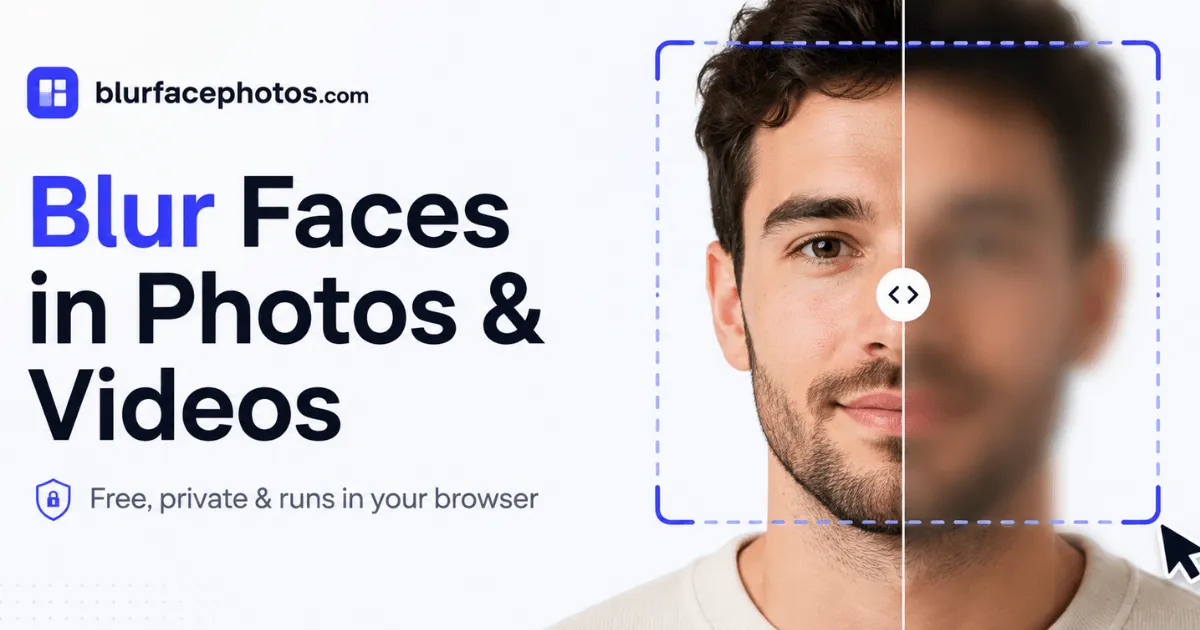
BlurFacePhotos is a free, private browser tool that blurs, pixelates, or censors faces in photos and video, with zero uploads and no sign-up.
Privacy is becoming a rare commodity in the digital age, especially for people who appear in photos and videos shared online. BlurFacePhotos has carved out a niche by offering a free, browser-based service that blurs faces in photos and video with a strict no-upload policy. This review explores the tool's features, usability, pricing, and security posture, and compares it to traditional editing software and other face-anonymization services.
What is BlurFacePhotos?
BlurFacePhotos is a free, privacy-centric web application that enables users to blur, pixelate, censor, or hide faces in both still images and video, with the entire processing chain confined to the local browser. Conceived as an antidote to online face-blurring tools that quietly upload photos to remote servers, the service leverages client-side artificial intelligence and WebAssembly to detect facial features and apply redaction effects on the device itself. This fundamental architectural choice addresses a critical gap for journalists, law enforcement, medical researchers, HR departments, and ordinary consumers who need to share imagery without compromising the identities of individuals.
The platform is built for speed and accessibility: there is no account creation, no software installation, and no learning curve. For photos, the free tier is unlimited, covering up to five faces per image, with a handful of effects that range from a soft blur to a solid black bar. For video, the service provides an automatic face-tracking pipeline that processes MP4, MOV, and WebM files and exports anonymized clips as WebM. Premium subscriptions expand the face limit, enable batch processing of unlimited files, unlock Full HD and 4K exports, and remove advertisements. The site's features overview provides a detailed list of every option.
Key Features
On-Device Face Detection: The utility uses a lightweight neural network model that runs in the browser via TensorFlow.js or a similar framework to identify human faces in real time. The detection engine scans the image and outlines each face with a bounding box, allowing users to review what was found before applying any effect. The technology works reliably for images with up to five faces in the free plan; the Premium tier lifts this restriction for larger group scenes. This on-device approach not only protects privacy but also ensures that processing continues even if the internet connection drops, since everything happens locally.
Multiple Redaction Styles: Users can choose among eight distinct effects: standard blur, pixelation, mosaic, a solid black bar, a white bar, noise, color inversion, and an emoji sticker overlay. Each effect can be applied to the entire face, the eye region, the mouth area, or a custom manually defined region. This granularity is valuable for different scenarios: a journalist might prefer a subtle blur to preserve context, while a strict redaction for a legal document might call for a black bar. The emoji option adds a playful touch for social media posts, letting users cover faces with a laughing or smiley icon.
Video Face Tracking and Redaction: The video editor is perhaps the most compelling feature. When a user uploads a clip, the system runs face detection on a sample of frames, creates tracking markers, and then applies the selected redaction effect to every frame across the timeline. This frame-by-frame analysis is computationally intensive, but because it occurs locally, the tool is able to maintain the privacy promise. The exported WebM file preserves the original resolution up to 4K on Premium, and the free tier allows testing the video pipeline with a lower resolution and a time limit. This makes BlurFacePhotos a rare free tool that can handle video anonymization without forcing users to download heavy software.
Batch Photo Processing: For users dealing with multiple images, the batch feature is a huge time saver. Free accounts can drag and drop up to five photos at once; after a few seconds, all images are processed with the same effect applied. This is particularly useful for photographers who need to redact faces in an entire event series or for privacy officers who receive batches of incident photos. Premium subscribers can process an unlimited number of photos in a single batch, and the tool promises to handle them without degradation in speed.
Live Camera Blur: The camera mode uses the device's webcam to apply redaction effects in real time. This is a clever addition that serves live streamers, vloggers, and remote educators who want to protect participants' faces during a live broadcast or video call. The effect is applied to the video stream before it ever reaches an external platform, meaning that the anonymized feed is what gets recorded or transmitted. There is no way to accidentally expose the original feed.
No Sign-Up and No Watermark: The tool requires no registration, and free photo exports carry no watermark. This is refreshingly user-centric, as many competitors force users to create accounts or display promotional stamps. The simplicity of the workflow reduces the time from opening the page to downloading the anonymized image to under fifteen seconds in most cases.
How It Works
The first step is to navigate to the main page, where the hero section features a drag-and-drop zone. Users can either drop an image file directly onto the page or click the zone to open a file picker. The site supports JPG, PNG, WebP, and BMP images. Once the image is loaded, the browser reads the file using the FileReader API, and the face detection model begins to scan immediately. The interface then switches to the editor, revealing the imported photo on a canvas with any detected faces highlighted by a rectangular outline. A toolbar at the top offers three tabs: Image, Camera, and Video, allowing users to switch contexts without leaving the page.
For photo redaction, the user next selects the effect from a horizontal menu that shows live previews of each style. Clicking on a face outline selects that person, and toggles are available to switch between whole-face, eyes-only, or mouth-only redaction. If the user wants to apply the effect to a specific area not detected, they can draw a custom rectangle manually. A live preview appears immediately, and a comparison slider lets the user flick between the original and the anonymized version to verify the result.
When the user is satisfied, clicking the "Download" button triggers a canvas export that produces a PNG file. All operations happen in memory, and the original image file is never uploaded to any remote server. For video, the process is analogous but more complex: the user uploads a video file, the tool samples frames to identify faces, and then applies the effect to the entire clip. The processing time depends on the video length and resolution; a 1-minute 1080p clip might take a minute or two on a modern laptop. The exported file is saved as WebM, which offers broad compatibility but may require conversion for certain platforms that prefer MP4. No account is needed for any photo workflow, so the download can happen instantly.
Technical Implementation
The frontend is built with Next.js and React, and the face detection model is compiled to WebAssembly to achieve near-native performance in the browser. The use of WebAssembly is crucial for video processing, as JavaScript alone would struggle with real-time frame analysis. The tool likely uses a lightweight face detection library such as MediaPipe or TensorFlow.js with a pre-trained model, which can detect facial landmarks and boundaries without sending data to the cloud. The export pipeline uses the Canvas API to generate PNG images and a WebM encoder for video. This architecture is transparent in the page's source code and contributes to the tool's low latency and small server footprint. The reliance on browser APIs means that the tool works offline once the page is cached, which is a bonus for field reporters with intermittent connectivity.
Onboarding and User Experience
The onboarding experience is notably minimalistic, which is a strong point for a utility that is meant to be used quickly. The homepage immediately presents a large dropzone, and there is no clutter or multi-step tutorial. First-time visitors can upload a photo within seconds, and the intuitive toolbar makes the editing process discovery-oriented. The before-and-after comparison slider is a nice touch, providing immediate visual feedback that boosts trust and confidence in the tool's output.
The interface is responsive and adapts well to different screen sizes, from a desktop monitor to a smartphone. On mobile, the canvas and controls are appropriately scaled, though precise manual selection of facial areas can be a bit tricky with a small touchscreen. The site's performance is generally smooth, with face detection completing in under a second for typical JPG images. Video processing is more demanding, and the tool provides a visual progress indicator so users know how much time remains.
Use Cases
For Journalists and Documentary Filmmakers: In conflicts, protests, and socially sensitive stories, journalists must balance the public's right to know with the safety of their sources. BlurFacePhotos enables a photographer to anonymize faces on the spot, directly in a browser, without trusting a third-party service that could leak the location data embedded in the photo's metadata. The video feature allows documentary filmmakers to interview a whistleblower with the face tracked and blurred across the entire footage, while the original high-resolution file remains only on the reporter's device. The free tier is sufficient for stills, and the premium tier provides the necessary quality for broadcast.
For Social Media Managers and Family Photographers: Posting photos of children, guests at a private event, or friends who did not give consent is a common issue. A social media manager handling a brand's community events can use BlurFacePhotos to redact faces of individuals who opted out of public posts. The batch mode makes it possible to process an entire gallery of 200 pictures within minutes, using a uniform pixelation effect. Family photographers can also use it to create "blurred crowd" effects for aesthetic purposes, or to emphasize a main subject by leaving other faces soft.
For Human Resources and Compliance Teams: In corporate environments, compliance officers often need to prepare visual evidence for internal investigations, workplace safety training, or public sustainability reports. Anonymizing the people in these images is essential to avoid privacy violations. Because blurfacephotos.com processes data locally, HR teams can handle sensitive employee photos without worrying about the cloud provider's data retention policies. The tool's alignment with GDPR's principle of data minimization is a notable advantage in this context.
For Educators and Researchers: Researchers in fields like psychology, sociology, or medicine publish images of study participants, and ethics boards require that identities be concealed. BlurFacePhotos offers a simple way to create anonymized stimuli for experiments where faces are not the variable of interest. The fact that the tool is free and has no login requirement means that research assistants can use it without institutional approval for third-party services. Educators can also demonstrate the concept of digital anonymity in journalism or media studies classes, letting students experiment with different redaction effects.
Privacy and Security
The defining feature of BlurFacePhotos is its local-first architecture. According to the website, everything runs in the browser and the photos are never uploaded. This is not just a marketing claim; it is technically verifiable in the sense that the site's code does not include any network requests for image data. The only external requests are for loading the page's assets, fonts, and analytics scripts (the site uses a cookieless analytics script from datafa.st). No image data is sent to these services. This design has significant implications for security: there is no server breach vector, no cloud storage to be subpoenaed, and no third-party data processors to include in a GDPR audit. For business users, this drastically reduces the legal burden of using the tool.
That said, the free tier is ad-supported, which means the page displays third-party ads. Users should be aware that while their photos stay local, the surrounding webpage may contain trackers from ad networks. The company states that its own analytics are cookieless, but the ad network may use its own cookies. Premium subscribers pay to remove ads, which also eliminates this concern. For the most privacy-sensitive users, the premium tier is the safer option.
Comparison with Alternatives
Compared to Adobe Photoshop, which is the gold standard for image editing, BlurFacePhotos is far more approachable. Photoshop requires a subscription, download, and familiarity with layers and masks, whereas BlurFacePhotos has a single-purpose interface that anyone can learn in seconds. However, Photoshop offers indefinite manual control and the ability to blur faces with complex motion tracking or even manual frame-by-frame editing in Premiere Pro. For casual or semi-professional needs, BlurFacePhotos is likely sufficient.
Among web-based competitors, Facepixelizer and iVAntiY are popular but they typically work only on still images and usually upload files to a server for processing. BlurFacePhotos’ main advantage is the video support and the local processing. Some tools like Skitch (macOS) offer a simple blur tool but not automatic face detection. Cloud APIs like AWS Rekognition or Google Vision can detect faces, but they require developers to build a custom pipeline and manage their own redaction logic, and they charge per request.
The closest commercial alternative is probably the video redaction features in professional tools like DaVinci Resolve or HitFilm, which are overkill and require a steep learning curve. BlurFacePhotos’ Premium price of $4.99 per month is a fraction of the cost of any video editor subscription. For a business that only needs face bluring on a few clips a month, the tool is a compelling value.
Pricing & Value
BlurFacePhotos offers three tiers: Free, Premium, and a planned API & Business. The Free tier is $0 forever and includes unlimited photo redaction, support for up to five faces per image, batch processing of up to five photos at a time, and no watermark on exports. It is supported by advertisements, which appear on the page but do not affect the images themselves. The Premium tier costs $4.99 per month billed annually or $8.99 on a month-to-month basis. It removes all ads, unlocks video redaction with unlimited exports, allows batch processing of unlimited photos and clips, lifts the five-face cap, and enables Full HD and 4K video export. Premium also includes a commercial-use license, which is important for creators who monetize their content. The full details can be found on the pricing page.
The API & Business tier is listed as "coming soon" with a planned price of $49 per month. It will offer a REST API, pay-as-you-go credits, bulk processing, and priority support. This tier is aimed at organizations that need to anonymize media at scale, such as news agencies or API-driven platforms.
For an individual user who only needs to edit photos occasionally, the free plan is more than adequate. For a freelance videographer or small business that regularly publishes video content with faces, the Premium price is modest. Commercial-use licensing would cost extra in many other tools, so the bundled license adds value. The absence of any free video export option is a slight disappointment, but the low entry price makes it a low-risk purchase.
Frequently Asked Questions
Is BlurFacePhotos really free for unlimited photos?
Yes, the free plan includes unlimited photo redaction with no watermark and no account. The only limits are the five-face detection cap and the batch size of five images. Users can manually add faces beyond the cap, and the tool will still process them.
Does BlurFacePhotos work on mobile devices?
The web app is responsive and works in browsers on iOS and Android. The camera tab relies on the device's webcam, which is supported on most modern smartphones. Some older iOS versions may have compatibility quirks, but overall the experience is usable for basic tasks.
Can I use BlurFacePhotos for commercial purposes without paying?
The commercial-use license is included in the Premium tier. The free tier's terms imply personal use, and using the free version for client work would violate the intended usage. To be safe and compliant, commercial users should upgrade.
What video file sizes can BlurFacePhotos handle?
There is no explicit limit mentioned, but because processing is local, the file size is constrained by the device's memory. A typical smartphone video of 100 MB is fine, but very large files might cause slowdowns. The tool uses progressive processing and can handle clips of several minutes, but it is not designed for feature-length films.
How does BlurFacePhotos compare to using Photoshop for face blurring?
Photoshop offers more control, filters, and batch automation, but it requires a paid subscription and a steep learning curve. BlurFacePhotos is faster for the single task of face redaction, and its local processing offers stronger privacy guarantees than Adobe's cloud-based file storage. For professional-grade video tracked blurring, Adobe After Effects is still more robust, but for most users, BlurFacePhotos is a simpler and more private option.
Final Verdict
BlurFacePhotos stands out as a privacy-first utility that successfully bridges the gap between convenience and confidentiality. Its browser-based, no-upload architecture is a genuine innovation in a space where most tools collect user data. The interface is clean, the effects are versatile, and the free photo plan is generous enough for many users to never need to pay. The video capabilities are a differentiator, though they require a subscription, and the WebM-only export might be a compatibility hurdle for some workflows. The five-face cap on the free tier is a limitation for large group photos, but it can be manually bypassed. Overall, BlurFacePhotos is highly recommended for journalists, content creators, and privacy-conscious individuals who need a dependable way to anonymize faces without compromising their own security. More information is available on the FAQ page.
Pros & Cons
Pros
- All photo and video processing runs entirely in the browser, so users' media is never uploaded to a server, a level of privacy that is rare in online face-blurring tools.
- The free photo plan is genuinely useful, offering unlimited image redaction with no watermark and no account creation, which lowers the barrier for casual users.
- The range of redaction effects includes blur, pixelate, mosaic, black bar, noise, and emoji, with the ability to target eyes, mouth, or the whole face.
- Automatic face tracking in video mode enables frame-by-frame redaction in MP4 and MOV files without installing complex video editing software.
- Batch photo processing allows users to anonymize up to five images at once, saving time for photographers and content managers who handle large volumes of media.
Cons
- Video redaction and unlimited batch processing require a Premium subscription starting at $4.99 per month, which may be overkill for someone who only needs occasional photo editing.
- Exported video files are limited to WebM format, which can cause compatibility issues with platforms that prefer MP4 or restricted editing environments.
- The free plan caps automatic face detection at five faces per image, so large group photos require manual selection of the additional faces.