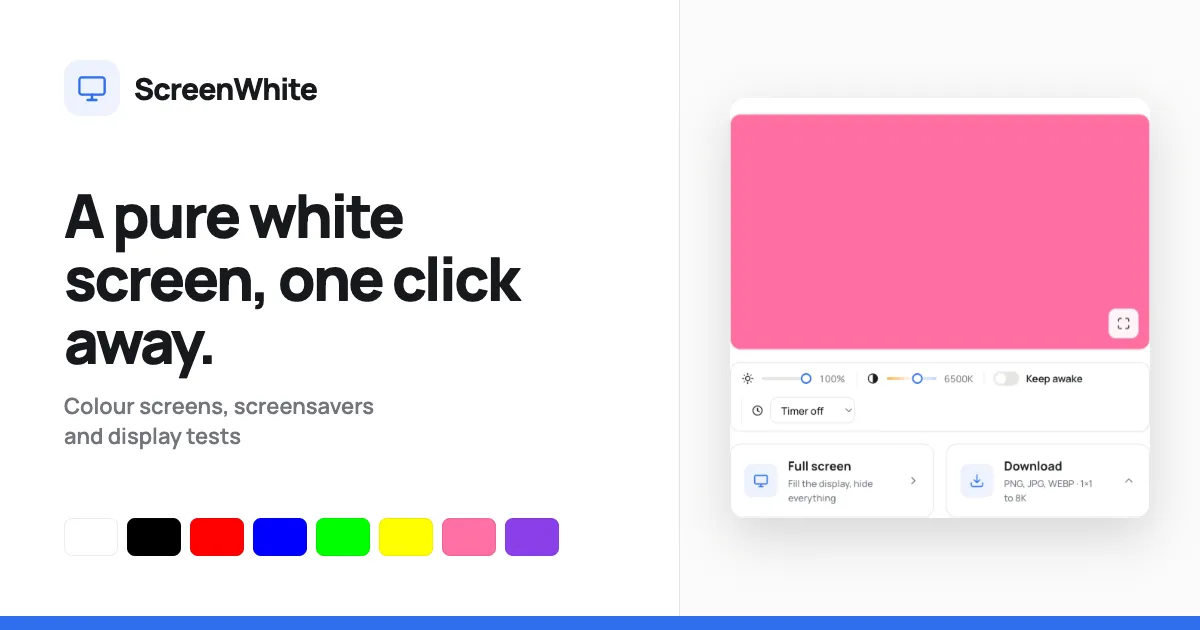
ScreenWhite is a free web tool that turns any display into a full-screen white background, with brightness, warmth, and 8K image downloads.
What is ScreenWhite?
ScreenWhite is a free, browser-based white screen utility that instantly fills any display with a pure white background. The service solves a surprising number of practical problems, from creating a soft fill light for video calls to serving as a backlight for tracing and helping users spot dead pixels or dust on their monitors. Built for remote workers, designers, video callers, and hardware enthusiasts, ScreenWhite is deliberately lightweight, with a page size of around 6 kilobytes, and requires no sign-up or account.
The primary value proposition is the speed and simplicity of turning a screen white. A single click or keystroke paints the display with solid white before the stylesheet or JavaScript even loads, because the color is set inline in the HTML. Users also gain granular control through sliders for brightness and color temperature, the ability to keep the display awake, and access to downloadable white images up to 8K. Everything runs in the browser, on any device, with no software installation.
Key Features
ScreenWhite packs several thoughtful tools into a minimal interface:
-
One-click fullscreen white screen – The main button enters fullscreen mode and paints the entire display white. Pressing
Fon a keyboard orFull screenin the interface works instantly, and pressingEscexits. Because the color is inline, there is no flash or delay. -
Brightness and colour temperature sliders – Two ranges let users adjust the perceived brightness from 10% to 100% and shift the color temperature from 2000K to 9000K. The page recalculates the actual hex color rather than layering a filter, so the controls themselves remain un-tinted and the result is more accurate.
-
Keep awake toggle – A checkbox requests the Screen Wake Lock API, which prompts the operating system to keep the display on with no user interaction. The wake lock releases as soon as the page is left or the tab becomes hidden, and it reacquires automatically when returning.
-
Image download panel – Users can choose PNG, JPG, or WEBP and select a preset size from a single pixel to 7680×4320 (8K). The server generates PNG files as one-bit palette images, making even an 8K download only a few kilobytes. Direct links are provided for common sizes.
-
Timer and URL sharing – A timer can automatically exit fullscreen after 1 to 60 minutes. All settings, including brightness, color temperature, and timer state, live in the URL query string, so sharing a link reproduces the exact screen on another device.
-
Cross-platform browser support – The tool works on desktop browsers, phones, tablets, and TVs. On iOS Safari, true fullscreen is not available, but adding the page to the home screen opens it in a full-viewport mode with no browser interface.
How It Works
The user journey is remarkably short. Opening the page reveals a white preview block along with the main controls. A user who wants a white screen immediately can click the Full screen button or press F, and the display fills completely. From there, the sliders for brightness and color temperature appear in a bottom tool panel, allowing real-time adjustments without leaving fullscreen mode. The Keep awake checkbox is a simple toggle, and the timer is a dropdown that sets a countdown for auto-exiting.
For users who need a file instead of a lit display, the download panel expands beneath the main buttons. The first step is choosing a format (PNG, JPG, or WEBP), then picking a resolution from HD to 8K. Clicking Download generates the image immediately in the browser or via a server endpoint, depending on the format. Direct image URLs are also available for embedding or quick access.
Since the page stores no data, settings are encoded in the URL. A user can adjust brightness to 80% and temperature to 4000K, copy the address, and send it to a colleague who will see the same tinted white screen. The site also offers a color explorer, screensaver-style tools like DVD screensaver or Matrix rain, prank screens such as fake update screens, and display tests including a dead pixel test. These are linked from the navigation, making ScreenWhite a small suite of display utilities centered on the solid color screen.
Use Cases
ScreenWhite's simplicity gives it a wide range of applications:
-
Remote workers and content creators – In a dimly lit office or hotel room, the screen can become a soft fill light for webcam calls or video recordings. Raising the brightness and warming the temperature to 4000K flatters skin tones, while the wake lock prevents the display from dimming during long conversations.
-
Designers and illustrators – The white screen turns a tablet, laptop, or monitor into an impromptu light table. Artists can place paper or thin tracing film over the screen and follow the glow to trace lines or transfer sketches. The high brightness and pure white make this effective even in low ambient light.
-
IT professionals and display enthusiasts – When validating a new monitor or troubleshooting an old one, a full white screen instantly reveals dead or stuck pixels, which remain dark against the bright field. ScreenWhite's download feature also lets technicians store test images at various resolutions for offline testing or calibration.
Frequently Asked Questions
Is ScreenWhite really free? Yes, ScreenWhite is free forever. There is no sign-up, no watermark, no trial period, and no account requirement. The website does not store any personal data or uploaded content.
Can I keep my screen awake while using ScreenWhite?
Yes, but only when the user explicitly enables the Keep awake checkbox. This triggers the browser's Screen Wake Lock API to prevent the display from sleeping. The wake lock is released automatically when the user leaves the page or the tab is hidden, and the page can re-acquire it when the tab becomes active again.
What file formats and sizes are available for download? Users can download white images in PNG, JPG, or WEBP. Available resolutions include HD (1920×1080), 2K (2560×1440), 4K (3840×2160), 5K (5120×2880), 8K (7680×4320), plus smaller options such as a 1×1 pixel and square 2048×2048. Direct image URLs are provided for HD, 4K, and 1×1.
Does ScreenWhite work on iPhone and iPad? Yes, but with a limitation: Safari on iOS does not allow web pages to enter true fullscreen mode. To get a full-screen white background, users can add the page to their home screen via the Share menu. The page then opens in a standalone viewport that fills the entire display with no browser chrome.
Is there any tracking or database involved? No measurements are stored. ScreenWhite has no database, no analytics scripts running, and no server-side logging of user behavior. The only server interaction is generating the requested PNG image, which is returned directly and never stored on disk.
Pros & Cons
Pros
- Provides a pure white screen in a single click, with the color painted in the first frame for instant response.
- Offers precise brightness and color temperature sliders that recompute the actual color, preventing tinted UI controls.
- Includes a wake lock that keeps the display from sleeping but releases automatically when leaving the page.
- Generates downloadable white images in PNG, JPG, or WEBP up to 8K, all without a watermark or account.
- The entire page weighs about six kilobytes, making it one of the fastest tools of its kind for quick use.
Cons
- True fullscreen mode is unavailable in iOS Safari unless the user manually adds the page to their home screen.
- Users need an internet connection and a modern browser to access the full functionality, as there is no offline desktop app.
- The service is limited to solid color screens and does not support gradients, multi-color patterns, or animated effects.