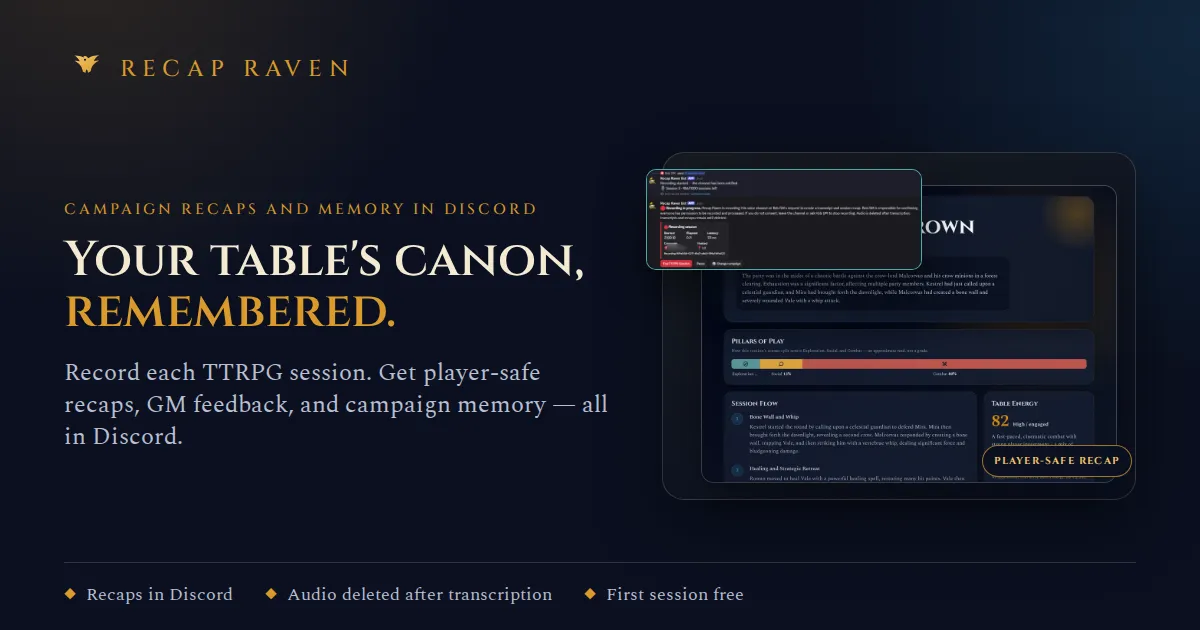
Recap Raven records Discord D&D sessions into player-safe recaps, GM notes, and searchable campaign memory with transcript citations.
What is Recap Raven?
Recap Raven is a Discord-native AI bot that records tabletop RPG sessions and automatically transforms raw voice chatter into structured session materials. It solves the perennial problem of lost continuity in long-running campaigns by generating player-safe recaps, private GM analytics, and a searchable campaign memory with every answer cited directly to the transcript. Built for Dungeon Masters and players who live in Discord, the bot captures the entire session without requiring anyone to take notes during play.
The tool goes beyond simple transcription. It produces a shareable recap that strips out GM secrets, a separate GM report with coaching feedback and spotlight balance, and a living world wiki that updates from each conversation. For groups that have been playing for years, it acts as an institutional memory, letting anyone ask "Where did we leave the artifact?" and receiving a quote-backed answer. The service supports English, Italian, Spanish, French, German, and Brazilian Portuguese, making it viable for international tables. Pricing starts with a free trial session, then a $7.99 per month tier for five sessions, and a Campaign Memory plan from $11.99 per month for deeper cross-session knowledge.
Key Features
Player-Safe Recaps
The bot automatically generates a narrative summary of each session, highlighting key moments, decisions, and discoveries. It deliberately filters out GM-only notes and AI speculation, so players only see what actually happened at the table. The recap is posted back to the Discord channel within minutes of the session ending.
Ask with Receipts
Campaign memory powers a question-and-answer interface where users can ask about NPCs, quests, items, and past events. Each response is anchored to direct transcript quotes, allowing players and GMs to verify the source. The system draws from the entire campaign history, not just the most recent session.
Hooks and Open Threads
The bot tracks unresolved plot threads, promises, and mysteries across sessions. It flags when a thread may have been resolved and shows the relevant evidence. This helps GMs keep track of multiple storylines without maintaining a separate wiki or spreadsheet.
Campaign World Wiki
The world wiki is automatically populated and updated as sessions progress. It contains people, places, items, and lore, with aliases and related details. GM-only information stays hidden from players, while player-facing entries are clean and editable.
DM Campaign Overview
GMs get a private dashboard that breaks down each session by spotlight balance, table energy, attendance, and pillars of play (exploration, social, combat). The system also provides coaching feedback, such as noting which threads the table engaged with most or suggesting where to slow down.
Next-Session Prep
Using open threads and recent decisions, the bot generates likely directions for the next session. It offers practical prompts and areas to prepare, rather than a prescriptive script. This helps GMs arrive at the table ready without over-preparing.
How It Works
To get started, a user invites Recap Raven to their Discord server and creates a campaign. When the group is ready to play, a quick /session start command puts the bot into recording mode in the voice channel. The bot announces the recording and provides a visual indicator. Once the session wraps up, the audio is uploaded and transcribed, typically within ten minutes.
The processing pipeline identifies speakers, maps speech to player characters, and separates GM dialogue from player dialogue. It then produces multiple outputs: a player-safe recap, private GM notes and analytics, a campaign memory entry, and updates to the world wiki. The recap is posted to the designated text channel, while the GM report remains visible only to the GM. Users can query the campaign memory at any time by asking questions in a dedicated channel, receiving answers with transcript citations. All raw audio is deleted after transcription, and users can export or delete their data at any time.
Use Cases
A busy DM running a weekly D&D game
After three hours of voice chaos, the DM gets a structured recap and a private report showing which players drove the session and what topics generated the most energy. Instead of spending Sunday morning writing notes, the DM uses the generated "next session prep" to quickly prepare.
A long-running campaign with a complex web of NPCs and lore
With dozens of sessions recorded, the campaign memory becomes a reliable reference. Players can ask the bot to remind them of a character name or a past bargain, and the answer includes the exact transcript quote. The world wiki stays current, so no one has to manually update a homebrew wiki.
An international group playing in a supported language
The bot transcribes and recaps sessions in English, Italian, Spanish, French, German, and Brazilian Portuguese. A table that mixes languages can still get a coherent recap in the group's primary language, and the citation system makes it easy to verify translations.
Frequently Asked Questions
Do players need to consent to recording?
Yes. Recap Raven announces the recording in the chat and plays a voice cue when audio playback is available. The bot shows clearly when it is recording, and raw audio is deleted automatically after transcription.
What is included in the free session?
The free tier includes one complete recorded session, transcription, a player-safe recap, private GM notes, session analytics, and a trial of campaign memory and Ask. No credit card is required.
Can players see the GM report?
No. GM notes, analytics, and coaching feedback are private to the GM. Players only see the player-safe recap and their own transcript, which is built from what was said at the table.
What languages are supported?
Recap Raven supports English, Italian, Spanish, French, German, and Brazilian Portuguese for transcripts and recaps. The interface itself is in English.
How long does processing take?
Processing typically completes in under 10 minutes, but longer recordings or high traffic can extend the wait. The app shows the processing status in real time.
Pros & Cons
Pros
- Automates session note-taking and recap generation directly within Discord, eliminating the need for manual documentation.
- Sources every answer in campaign memory to exact transcript quotes, giving users verifiable evidence.
- Deletes raw audio after transcription and avoids using customer content to train AI models, a strong privacy stance.
- Supports six languages, making it accessible to non-English-speaking TTRPG communities.
- Provides a generous free trial with one full session and no card requirement, lowering the barrier to testing.
Cons
- Only works with Discord voice channels, so in-person or video call sessions need a workaround.
- The free tier is limited to a single session, which may not be enough to evaluate long-term value.
- Processing may take longer than 10 minutes for lengthy recordings or during peak hours, which can delay recaps.