MySOP.guru turns any workflow into a professional SOP with automatic screenshots and pay-per-document pricing. First export free.
What is MySOP.guru?
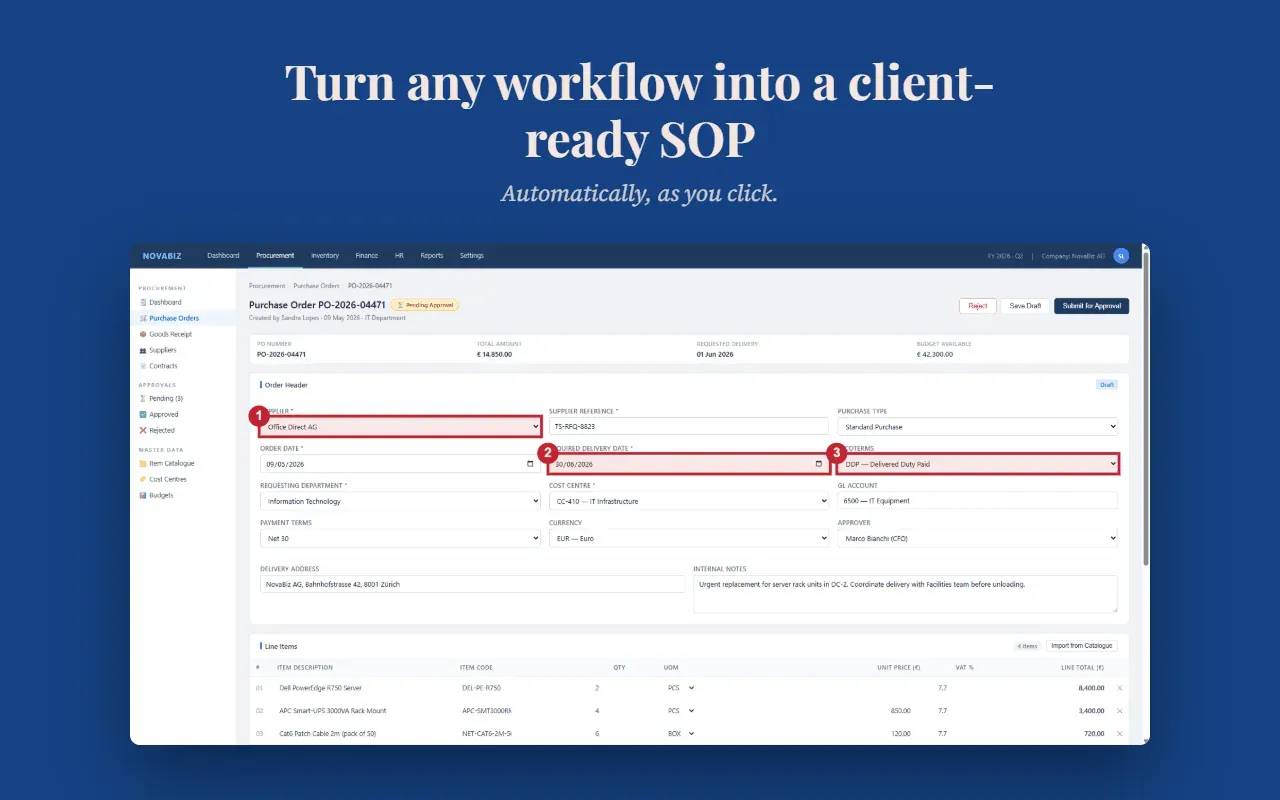
MySOP.guru is a Chrome extension that transforms any workflow performed in a browser into a polished Standard Operating Procedure (SOP) document. By automatically capturing screenshots and listing numbered callouts for every click, it eliminates the manual work traditionally involved in process documentation. The product targets teams that do not produce documentation daily but periodically need professional step-by-step guides for onboarding, handovers, system changes, and client deliverables. Instead of charging a monthly subscription, MySOP.guru adopts a pay-as-you-go model: unlimited free capture and editing, a free first export, and a €5 fee per PDF thereafter.
Key Features
- Automatic Screenshot Capture: The extension records every click, form entry, and page transition, generating full-page screenshots with numbered badges that highlight exactly what was clicked. This makes it easy for readers to follow even complex web application procedures.
- Professional PDF Export: Exports are generated as clean PDF documents that incorporate the user's branding, including logo, header, footer, and page numbers. The output is ready to be sent to new employees, clients, or auditors immediately after payment.
- Smart Page Grouping: When multiple interactions occur on the same page, the tool groups them into a single step with a sub-action list, keeping documents concise and readable. This avoids the clutter of dozens of tiny steps.
- Pay-per-Export Pricing: There are no monthly fees or seat limits. Users pay €5 for each PDF export, with HTML exports available at €3. Credit bundles offer discounts, bringing the cost per document down to €4 or €3.60 for 10 or 25 exports. Quiet months cost nothing.
- Full Editor Control: Before exporting, users can reorder steps using drag-and-drop, edit descriptions inline, split or merge steps, and remove unnecessary screenshots. This ensures the final document matches the intended procedure precisely.
- White-Label Branding: Organizations can upload their own logo, choose fonts, set colors, and customize headers and footers. Every export looks like it was produced by the user's own team, not by a third-party tool.
Use Cases
- Human Resources Onboarding: HR teams can document the full onboarding workflow for a new starter, from account creation to system access permissions. The captured SOP can then be reused for every future employee, reducing repetitive questions and inconsistent instructions.
- Operations Handover: When a key employee leaves, the team can quickly capture the processes that only that person knows. Instead of an emergency search through emails or memory, the SOP becomes a tangible asset for the successor.
- Consulting Client Deliverables: Consultants and agencies can produce branded SOPs that are delivered at the end of an implementation project. Each document reflects the client's branding, making it a polished final deliverable without extra formatting effort.
Frequently Asked Questions
Is MySOP.guru free to start? Yes, the first PDF export is free and requires no credit card. Users can also capture and edit unlimited workflows without paying anything.
How does the pay-per-document model work? Users are charged €5 per PDF export, or €3 per HTML export, only when they choose to generate a document. There are no recurring subscription fees.
What platforms does the Chrome extension support? The extension works with any website or web application running in Chrome, including internal panels, CRMs, HR systems, and single-page apps. It does not capture desktop software.
Can a single SOP cover multiple applications? Not in a current session; each capture is limited to one application. The roadmap includes support for multi-application sessions, but until then, cross-system processes require separate captures and exports.
Pros & Cons
Pros
- Pay-per-document pricing eliminates subscription waste for teams that document occasionally
- Automatic screenshot capture with numbered callouts streamlines SOP creation
- White-label branding allows exports to carry the user's logo and colors
- First export free with no credit card required lowers the entry barrier
- Full editor control with drag-and-drop reordering before payment
Cons
- Single application per capture session limits multi-system workflows
- No subscription option for teams with high documentation volume
- Desktop applications outside the browser cannot be captured