Voicemail Saver & Text Backup helps iOS and Android users archive voicemails, texts, photos and documents to secure cloud storage, with a free tier.
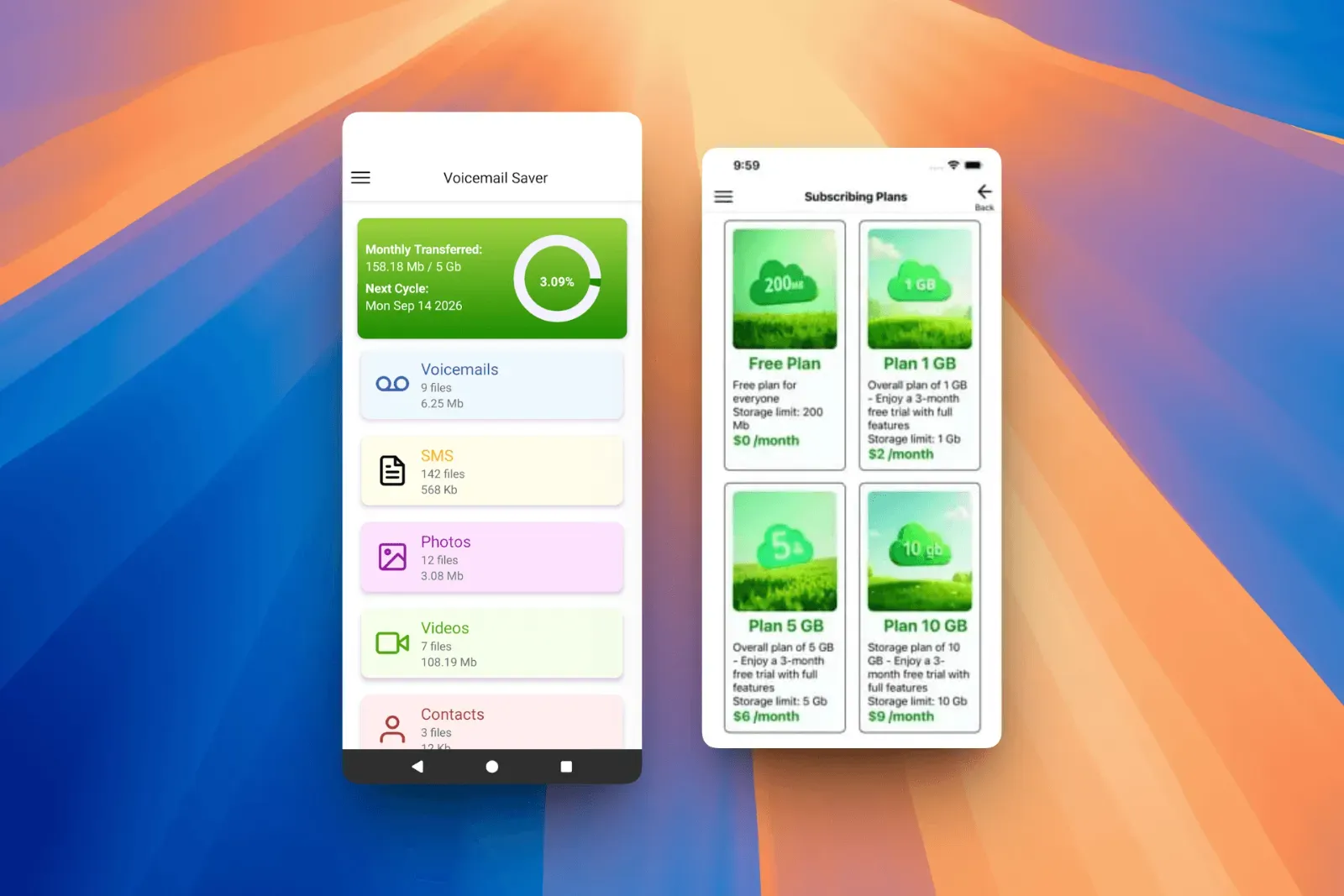
Voicemail Saver & Text Backup is a mobile voicemail backup app built to move valuable phone messages and related files into secure cloud storage. The service focuses on a narrow but important job: preserving voicemails, texts, contacts, photos, videos, audio recordings, and documents so they survive device changes, storage cleanup, and everyday phone use. It is aimed at consumers and small teams that want a straightforward archive without cables, PIN codes, or a complicated desktop workflow. In a market filled with general cloud drives, Voicemail Saver & Text Backup positions itself as a specialist utility with a long operating history in voicemail preservation since 2001.
What is Voicemail Saver & Text Backup?
Voicemail Saver & Text Backup is a mobile archiving application from VoicemailSaver.com that backs up voicemail messages, text messages, contacts, photos, videos, audio files, and documents to a secure cloud location. The problem it solves is familiar to anyone who has lost a voicemail after a carrier deletion window, filled a phone with media that cannot be easily moved, or switched devices without a clean way to preserve important conversations. The app gives users a dedicated place to create a permanent copy and then remove the original from the phone only after the backup is confirmed. It is built for families preserving personal messages, professionals keeping client communications, and phone users who need to clear storage without losing important records.
Its positioning is specialist and practical rather than broad. It does not try to replace a full productivity suite or a general-purpose cloud drive. Instead, it emphasizes simplicity, confirmed transfers, and cross-device access with no cables or PIN codes. The company also points to its history as a voicemail backup pioneer since 2001, which gives the product a longer track record than many app-store utilities in the same category. The public app page is concise: it presents three core benefits, a demonstration video, App Store and Google Play buttons, a logo identifier, a tier promotion, policy links, and a My Account login for existing cloud accounts. That narrow presentation suggests a focused tool rather than a sprawling platform, and the value depends on how much a user needs permanent message preservation.
Key Features
-
Unified backup for multiple file types. Voicemail Saver & Text Backup handles voicemails, texts, contacts, photos, videos, audio files, and documents in one workflow. That breadth matters because phone archives rarely consist of a single format. A user may need to preserve a saved voicemail alongside a text thread and a set of photos from the same period, and a single app reduces the need to juggle separate export methods.
-
Secure cloud storage with cross-device retrieval. Files are stored in a secure cloud location, and from there users can download them to another device for safe-keeping. The cloud layer is the operational center of the product. It separates the archive from the phone itself, which is useful during device upgrades, repairs, or storage emergencies. The website does not publish detailed encryption specifications on the app page, so users who need enterprise-level assurances should review the linked policies before committing.
-
Cable-free and PIN-free workflow. The app explicitly avoids cables and PIN codes. That sounds minor until compared with older phone backup routines that require a desktop computer, a sync cable, and a series of prompts. The mobile-first approach is better suited to users who want to archive a message while traveling, working remotely, or helping a family member without technical support. The app page frames this as an easy and intuitive backup process, and the store buttons make installation the main entry point.
-
Confirmed backup before phone cleanup. The service advises users to delete files from the phone only after receiving confirmation that the backup is complete. This is an important safety step. Storage cleanup is one of the main reasons people seek a voicemail backup app, but deleting before verification can turn a routine archive into a permanent loss. The confirmation model gives the product a practical advantage over manual screenshotting, screen recording, or informal forwarding.
-
Free base service with paid advanced tiers. The lowest tier is always free, while advanced service is available for a monthly fee depending on usage. That structure makes the app accessible for light users who need occasional archiving, and it gives heavier users a path to more capacity. The current promotion makes all tiers completely free for three months, which lowers the barrier for testing the higher-capacity workflow.
-
iOS and Android apps plus web account access. The product is available through the Apple App Store and Google Play, and existing users can log in to the cloud server through the My Account link at app.voicemailsaver.com. The app name to search is Voicemail Saver & Text Backup, and the site warns that a competitor called Voicemail Saver is not the same product. That naming warning is unusually direct, but it is useful for app-store discovery because similar names can lead users to the wrong download.
How It Works
The user journey starts with app discovery. A prospective customer visits VoicemailSaver.com, reads the three benefit statements, watches the embedded video, and chooses the App Store or Google Play button. The site also shows the product logo and the exact app name so users can search correctly. The warning about a similarly named competitor is part of onboarding because the wrong app would not connect to the same cloud account or offer the same backup flow.
After installation, the user creates an account through the app. The website mentions that accounts are created via the app and that existing users can then log in to the cloud server. During the current promotion, the company recommends subscribing at the highest 10GB tier for the free trial period so file transfers are not limited, with the option to downgrade after the trial. This is a practical onboarding recommendation because new users often test the app with a large batch of media and messages, and a low limit could interrupt that evaluation.
Once the account is active, the user selects the voicemails, texts, contacts, photos, videos, audio files, or documents that need preservation and initiates the backup. The app uploads the selected items to the secure cloud location. The exact screen flow is not described in detail on the public page, but the product promise is clear: no cables, no PIN codes, and no desktop intermediary. After the upload, the user waits for confirmation that the files are backed up.
Only after confirmation should the user delete the originals from the phone to free storage. That sequence is central to the product. The archive remains available in the cloud, and the user can download files to another device when needed. For ongoing use, the cloud account becomes a reference library for important messages and files. A user might log in from a new phone or computer, retrieve a specific voicemail, and then continue with a normal device migration. The workflow is intentionally simple, and that simplicity is the main reason the app can appeal to non-technical users.
Use Cases
Preserving family voicemails. A person who has saved voicemails from a parent, grandparent, or old friend may worry about carrier retention limits or a phone upgrade. Voicemail Saver & Text Backup gives that user a way to move the recordings into cloud storage and keep them downloadable. The outcome is emotional rather than operational: the messages become a personal archive instead of temporary phone data. The three-month free access period makes this use case easy to test before paying for advanced capacity.
Small business communication records. A contractor, consultant, or solo business owner may receive client instructions by voicemail and follow-up details by text. Keeping both types of communication in one archive can support continuity when a phone is replaced or storage is tight. The app does not claim to be a full CRM or legal records system, but it can serve as a lightweight preservation tool for messages that should not disappear. A user can back up the relevant texts and voicemails, confirm the upload, and then clean the device without losing the client trail.
Phone storage recovery. A user with a nearly full phone may have years of photos, videos, audio files, and text attachments that are difficult to sort manually. Voicemail Saver & Text Backup offers a structured way to move selected items to the cloud before deleting them locally. The outcome is a phone that can receive new messages and updates again. This scenario is probably the most common entry point because storage pressure creates an immediate reason to act.
Device migration and repair. When a phone is lost, damaged, or replaced, the cloud archive can act as a bridge to the next device. A user can download backed-up voicemails and documents to a new phone or another device. The app does not replace a full phone-to-phone migration tool, but it covers the message and file types that are often hardest to move. For users who care about specific conversations more than every app setting, this targeted approach is easier to understand.
Pricing & Value
The public page describes a tiered model rather than a single price. The lowest tier is always free, which gives light users a permanent entry point. Advanced service is available for a monthly fee depending on usage, and the highest tier offers 10GB of capacity. The exact monthly prices for the advanced tiers are not listed on the app page, so buyers need to check inside the app or contact the company for current rates. That lack of public price detail is a transparency gap, but the free base tier reduces the risk of initial exploration.
A notable promotion changes the value calculation. All tiers are completely free for three months, and the offer is available until February 15, 2027. The company says the promotion exists to invite feedback from real users and to encourage testing of the new app. It also recommends starting at the highest 10GB tier during the trial and downgrading later if needed. For a user with a large archive, that advice is sensible because it avoids transfer limits during the first evaluation. The permanent free tier remains the safety net after the promotion ends.
Security, Privacy, and Account Management
Voicemail Saver & Text Backup stores files in a secure cloud location and provides account access through app.voicemailsaver.com. The public app page links to app terms and conditions, an app privacy policy, and an affiliate program page. These links matter because message archives can contain sensitive personal, medical, legal, or business information. The app page does not publish a detailed security whitepaper, encryption standard, or data retention schedule in the visible content, so careful buyers should read the privacy policy before uploading sensitive material.
Account management is straightforward in concept. The user creates an account through the mobile app, then uses the web login for cloud access. That separation is convenient because retrieval can happen away from the original phone. The company also operates a separate iPhone voicemail backup service and a mobile phone backup service, which suggests an established service business around phone message preservation. The app is the newer mobile-first layer, and the website uses the same brand and support channels. Users who need help can find contact options, policies, and a mailing list on the broader site.
Platform Availability and Market Position
Voicemail Saver & Text Backup is available for iOS through the Apple App Store and for Android through Google Play. The site provides direct store buttons and shows the app logo so users can confirm the correct download. It also warns that the competitor called Voicemail Saver is not the same product. That warning is a response to app-store name confusion, and it is a reasonable concern because both names sound nearly identical. Users searching for the product should use the full name Voicemail Saver & Text Backup and verify the logo before installing.
The product sits in a specialist niche between carrier voicemail, general cloud storage, and phone migration tools. A related iPhone voicemail backup service shows that the company serves users who want more than a simple app download. The app expands that service into a self-service mobile workflow with a free tier and paid capacity. Its market position is not based on artificial intelligence, automation, or team collaboration. It is based on preservation, simplicity, and a long history in voicemail backup since 2001. That focus can be a strength for buyers who want a dedicated tool, and a limitation for buyers who expect a broader communications platform.
Competitive Context
Most phone users rely on carrier voicemail, screenshots, forwarded messages, or manual exports through a computer. Those methods can work for a single message, but they become fragile at scale. Carrier voicemail may expire, screenshots lose audio, and desktop exports require time and technical comfort. Voicemail Saver & Text Backup competes by combining multiple message and file types in one mobile workflow with cloud retrieval. The no-cable, no-PIN promise is a direct response to the friction of older backup methods.
General cloud drives can store files, but they do not specialize in voicemail capture or mobile message archiving. Phone migration tools can move data between devices, but they may not provide a permanent independent archive. The app occupies a middle ground: more focused than a cloud drive, more permanent than a carrier inbox, and simpler than a desktop sync routine. The main competitive risk is not a lack of alternatives but confusion. Users may compare the app with free phone backups or built-in cloud services and decide that a specialist tool is unnecessary unless they have valuable voicemails or text records. The three-month free trial addresses that hesitation by letting users test the workflow with real files.
Who Should Consider Voicemail Saver & Text Backup?
The strongest fit is a user who already knows which messages or files must be preserved. That could be a family archivist with saved voicemails, a small business owner with client texts, or a frequent phone upgrader who wants a clean archive before switching devices. The app is also suitable for users who are not comfortable with cables, desktop software, or multi-step export menus. The mobile-first design and cloud login reduce the technical burden.
A weaker fit is a user who needs a full phone backup, including app data, settings, and system files. Voicemail Saver & Text Backup is not presented as a complete device imaging tool. It is also a weak fit for teams that need shared inboxes, compliance workflows, or administrative controls, because the visible product is oriented toward individual accounts. Buyers with strict regulatory requirements should treat the public policy links as a starting point and seek more detail before uploading sensitive records. For the core job of preserving messages and selected files, however, the product has a clear and understandable purpose.
Frequently Asked Questions
Is Voicemail Saver & Text Backup free? The lowest tier is always free, and advanced service is available for a monthly fee depending on usage. All tiers are currently free for three months as a promotional offer available until February 15, 2027.
What types of files can be backed up? The app supports voicemails, texts, contacts, photos, videos, audio files, and documents. Files are stored in a secure cloud location and can be downloaded to another device.
Does the app require cables or PIN codes? No. The product is designed as a cable-free and PIN-free mobile workflow. Users install the app, create an account, select files, and upload them to the cloud.
How does the free trial work? The company recommends subscribing at the highest 10GB tier during the free trial so file transfers are not limited. Users can downgrade after the trial period, and the lowest tier remains free.
Is this the same as the Voicemail Saver competitor? No. The website explicitly warns that a competitor called Voicemail Saver is not the same product. Users should search for Voicemail Saver & Text Backup and verify the logo before installing.
Final Verdict
Voicemail Saver & Text Backup is a focused mobile archiving tool with a clear value proposition: preserve important phone messages and files in the cloud, confirm the backup, then free device storage. Its strongest qualities are the unified file support, the cable-free workflow, the permanent free tier, and the three-month trial that lets users test the 10GB capacity without commitment. The company's long history in voicemail backup also gives it more credibility than a newly launched utility with no track record.
The main limitations are transparency and naming. Exact prices for the advanced tiers are not listed on the public app page, so buyers must check inside the app for current rates. The product name is also very close to a competitor, which creates avoidable app-store confusion. The public page provides limited technical detail about encryption, retention, and platform-specific steps, so users with sensitive archives should read the policies carefully. Even with those caveats, Voicemail Saver & Text Backup is worth considering for individuals and small businesses that need a simple, permanent cloud archive for voicemails, texts, and selected phone files.
Pros & Cons
Pros
- Combines voicemail, text, contact, photo, video, audio, and document backup in one mobile app, reducing the need for separate archiving tools.
- Stores backups in a secure cloud location and allows downloads to other devices without cables or PIN codes.
- Provides a permanently free lowest tier alongside paid advanced options, making basic archiving accessible to light users.
- Offers a three-month free trial across all tiers through February 15, 2027, with guidance to start at the 10GB tier for unrestricted testing.
- Draws on voicemail backup experience dating to 2001, giving the product a longer operating history than many app-store utilities.
Cons
- Exact pricing for advanced tiers is not clearly listed on the app page, so buyers must check inside the app or contact the company for details.
- The product name is very close to a competitor called Voicemail Saver, which may create confusion during app-store searches.
- The public page provides limited technical detail about encryption, retention, and platform-specific workflows beyond the linked privacy policy.