Restore old photos with AI: repair blur, scratches, and damage, colorize black & white pictures. Plans start at $4.99.
What is RestorePhotos?
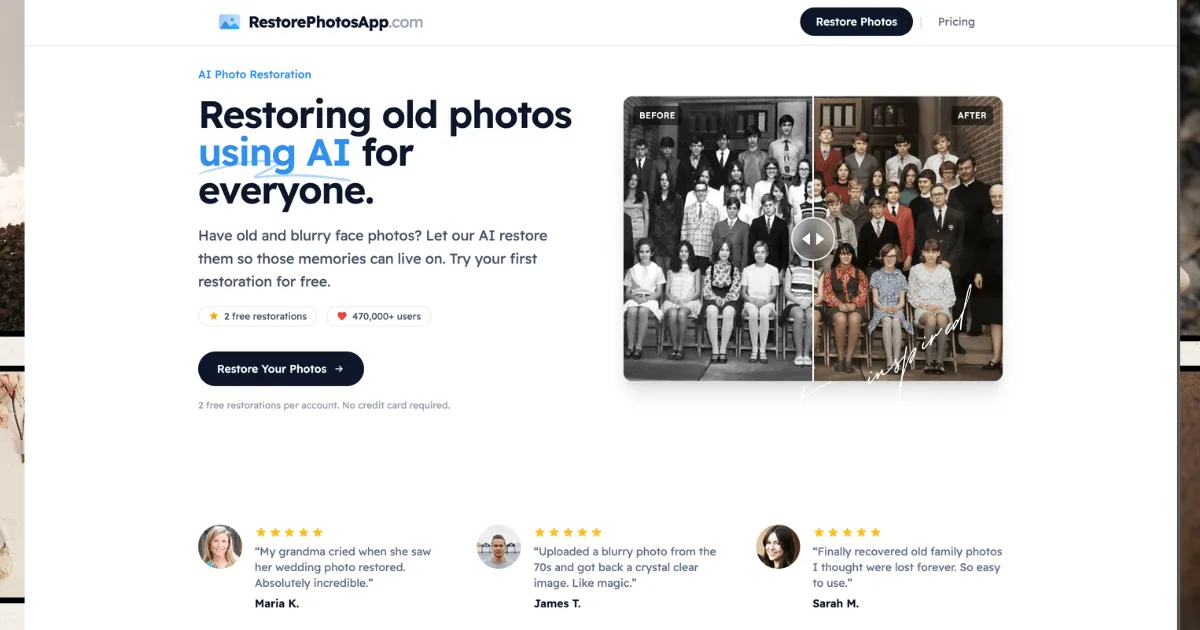
RestorePhotos is an AI-powered photo restoration tool that brings old, damaged, and blurry photos back to life. Designed for individuals and families, it uses advanced machine learning models to repair scratches, remove noise, sharpen blurry images, and colorize black and white photographs. The service is entirely browser-based, requiring no software installation, and processes images in under 30 seconds. With over 470,000 users and more than 2 million photos restored, RestorePhotos offers a cost-effective alternative to professional restoration services, with one-time payment plans starting at $4.99 for 10 photos.
Key Features
-
AI Face Restoration: The core feature uses a model trained on millions of photographs to reconstruct damaged facial features, remove scratches, noise, and blur while preserving the original character and expression of the subject. The AI analyzes edges, textures, and facial landmarks to rebuild missing details.
-
Colorization of Black & White Photos: Users can convert sepia or black and white images into realistic color photographs. The AI predicts natural skin tones, fabric colors, and background hues based on context, though results are plausible interpretations rather than historical records.
-
Sharpen Blurry Photos: The Sharpen style reconstructs sharp facial features and edges from soft, out-of-focus, or motion-blurred images. It is particularly effective for old phone photos, screenshots, and scanned prints where detail is lacking.
-
Multiple Restoration Styles: Users can choose from Restore, Colorize, Enhance, Cleanup, or Sharpen modes, each optimized for different types of damage or desired outcomes. This flexibility allows tackling scratches, fading, yellowing, water damage, and creases.
-
High-Resolution Output: Restored images are delivered at 1080p resolution, suitable for reprinting, sharing on social media, or archiving. Pro, Family, and Studio plans include full-resolution downloads.
-
Bulk Processing: The Family and Studio plans support batch restoration, enabling users to process multiple photos in one session rather than uploading them individually. This is ideal for digitizing entire photo albums.
How It Works
Users start by creating a free account, which includes 2 free restorations with no credit card required. To restore a photo, the user uploads an image (scanned print, digital file, or phone capture) through the browser interface. They then select a restoration style: Restore, Colorize, Enhance, Cleanup, or Sharpen. The AI processes the image in the cloud, typically completing the restoration in under 30 seconds. Once finished, the user can download the high-resolution result directly. Credits are consumed per restoration, and unused credits never expire. For large collections, the Family or Studio plans allow bulk uploads, and restored photos remain accessible for 30 days before being automatically deleted for privacy.
Use Cases
-
Family Historian Digitizing Old Albums: A user with a shoebox of faded, scratched family portraits from the 1940s can use the Family plan (150 credits for $19.99) to restore and colorize each photo. The bulk processing feature lets them upload multiple images in one session, and the 1080p output is suitable for creating a digital family archive or printing framed gifts.
-
Genealogist Recovering Ancestral Photos: A researcher working with scanned black and white images from the 1800s can leverage the Colorize style to add lifelike color to portraits. The AI's ability to handle severe damage and low-quality scans helps recover details that would otherwise be lost, making ancestors more relatable for family history presentations.
-
Small Business Owner Restoring Vintage Inventory Photos: An antique dealer or vintage clothing seller can use the Sharpen and Restore styles to improve blurry or damaged product photos taken with a phone. The quick turnaround (under 30 seconds per image) and low cost per credit ($0.11 on the Studio plan) make it practical for enhancing dozens of listing images without hiring a professional editor.
Frequently Asked Questions
How much does it cost to restore old photos? Plans are one-time payments with no subscriptions: Starter ($4.99 for 10 photos), Pro ($14.99 for 30), Family ($19.99 for 150), and Studio ($49.99 for 450). All include a 30-day money-back guarantee.
Is there a free trial? New accounts receive 2 free restorations with no credit card required, allowing users to test the quality before purchasing credits.
Can I colorize black and white photos? Yes, the Colorize style turns black and white or sepia photos into realistic color images. It uses one credit per restoration.
Do credits expire? No, purchased credits never expire. Users can buy a pack and use them over months or years without losing value.
What types of photos are supported? The AI works with any face photo, including old family portraits, wedding photos, baby pictures, military and graduation portraits, scanned prints, Polaroids, and phone captures of prints. It handles black and white, sepia, and color images from any era.
Pros & Cons
Pros
- One-time payment plans with no subscription, starting at $4.99 for 10 photos.
- Processes most photos in under 30 seconds with no software installation required.
- Offers multiple restoration styles including restore, colorize, sharpen, and scratch removal.
- Provides 2 free restorations on signup with no credit card needed.
- Credits never expire, allowing users to restore photos at their own pace.
Cons
- Severely damaged or extremely low-resolution photos may yield limited improvement.
- Colorization produces plausible colors but cannot guarantee historical accuracy.
- No offline mode; an internet connection is required for all processing.