OnVid is a free AI video generator that transforms text or images into HD videos in seconds, with top models like Kling and Veo and no watermark.
What is OnVid?
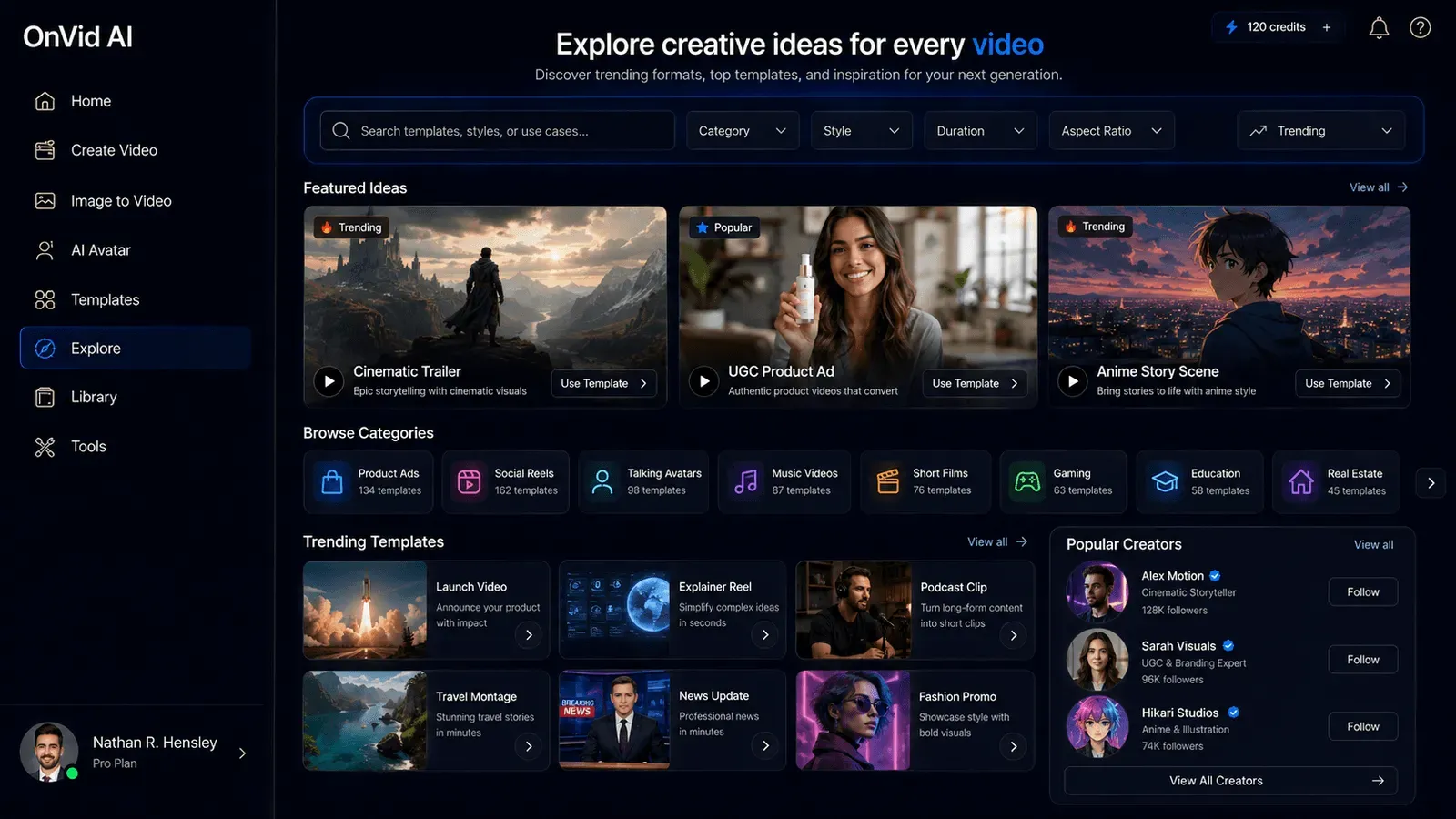
OnVid is a free AI video generator that turns text prompts or uploaded images into HD video clips in seconds. The platform aggregates several of the industry's most advanced generative video models, including Kling 3.0, Veo 3.1, Seedance 2.0, Hailuo 2.3, FLUX 3, and Hunyuan, into a single browser-based studio. This aggregation approach allows users to access state-of-the-art video generation without juggling multiple subscriptions, and it creates a level playing field where outputs from different models can be compared side-by-side. The service is designed for content creators, marketers, social media managers, and casual users who need polished, shareable video content without deep technical or editing skills.
The product's core value proposition is accessibility. While many AI video offerings require credit cards, enterprise approvals, or steep learning curves, OnVid's homepage immediately communicates "No signup · No credit card · Free to start." This is a deliberate strategy to reduce friction for first-time users. The meta description reinforces the promise of "text or images to HD video in seconds" across "140+ languages," with no watermark. In a market where premium tools often gatemark their outputs, the no-watermark claim is a significant differentiator.
OnVid also benefits from a thoughtful information architecture. The main navigation includes dedicated sections for Resources, Models, Alternatives, Comparison, and Blog. These sections educate users about the underlying technologies, provide comparison guides against tools like HeyGen and Runway, and offer data-driven reports such as "The 2026 AI Video Report." This content not only helps users make better decisions but also positions OnVid as a thought leader in the space. For a deeper look at the text-to-video workflow, the text-to-video AI generator page breaks down the process with practical examples.
The platform's international orientation is also worth noting. With hreflang tags for Italian, English, German, French, Portuguese, and Spanish, OnVid is clearly targeting a global audience. This multilingual support extends to the video generation itself, which can produce videos in 140+ languages. For a free tool, this level of localization is impressive and expands its usefulness to non-English-speaking creators.
The homepage's hero section presents a montage of AI-generated clips, ranging from a battle scene to a Tokyo superhero story, which immediately showcases the output quality. The headline, 'Free AI Video Generator,' is followed by the tagline 'Type a prompt or upload a photo, and our free AI video generator turns it into a finished video in seconds.' This clarity of messaging is a strong indication that OnVid is focused on simplicity and speed. The social proof section shows a 4.8/5 rating from 120,000+ creators, adding credibility. The design choices, from the model carousel to the hover-to-play gallery, make the product feel modern and polished.
Key Features
Model Aggregation Hub
The desktop view of the homepage includes a carousel and a comparison table that lists eight distinct models: Kling 3.0, Veo 3.1, Seedance 2.0, MiniMax H3, Hailuo 2.3, FLUX 3, Seedance 2.5, and Grok Imagine. Each entry includes a badge for speed or quality (for example, "Max quality," "Balanced," "Fast") and a short tagline. The comparison table adds columns for resolution, max length, and best use case. Kling 3.0, for instance, supports up to 4K resolution with roughly 10-second clips and is best for cinematic, multi-shot scenes. Seedance 2.5 offers native 4K and up to 30 seconds, ideal for long-form narratives. This breadth means a user can choose the precise tool for the job: a quick reaction clip might use Grok Imagine, while a high-fidelity brand video might use Kling 3.0. The aggregation eliminates the need to create accounts on each model's native platform.
Text-to-Video Prompt Engine
The text-to-video feature is the heart of OnVid. Users enter a plain-English description of what they want to see. The system then parses the prompt and generates a corresponding video. The site provides extensive prompt engineering guidance. For instance, the FAQ suggests starting with a clear subject, action, setting, and style, like "a golden retriever running on a beach at sunset, cinematic." The "Learn more" section includes articles on "AI video from text prompt, from idea to first draft," which walk through the process. The system can also incorporate style presets directly into the prompt, so a user can choose "anime" or "photoreal" from the UI, and the model will adjust its output. This makes text-to-video generation intuitive even for beginners.
Image-to-Video Animation
The image-to-video feature addresses the common desire to see a still photo move. The homepage highlights use cases such as animating a pet photo, a travel shot, or a selfie. The process is straightforward: upload an image, choose a length, and select a style. The model then adds motion, depth, and camera panning. The FAQ notes that the best results come from sharp, well-lit images with a clear subject. This feature is especially popular for creating fun, shareable content from personal photos. The dedicated image-to-video AI page provides further examples and details.
Granular Length Control
Length selection is a significant usability advantage. In the interface, users can set the video length before generation. The model comparison table makes it clear that different models support different ranges, from 5 seconds to 30 seconds or more. This means a user can plan whether they want a quick 6-second clip for a chat app or a longer 30-second sequence for YouTube. The FAQ explicitly mentions that AI video generators can make more than a tiny clip when the tool supports length selection, and OnVid's implementation is more flexible than many competitors. The UI likely uses a simple slider or segmented buttons, as seen in the "How it works" section where options like "5s," "10s," and "16:9" are displayed.
Style Presets
Style presets are another layer of creative control. The homepage showcases six presets: cinematic, photoreal, fantasy, product ad, claymation, and action. Each preset has a sample video. Cinematic creates filmic depth and dramatic lighting, while photoreal focuses on true-to-life detail. Fantasy enables epic, otherworldly scenes, and product ad applies clean studio lighting. These presets are selected before generation, guiding the AI model's aesthetic. This is particularly valuable for maintaining brand consistency or a specific creative direction. Users can also describe their own look in the prompt, but presets accelerate the process.
Export and Sharing Workflow
Finally, the export and sharing features are designed for immediate use. The homepage headline states "Download HD AI Video And Share Fast." Videos can be downloaded in HD or shared through a direct link. The platform advertises a no-watermark experience, which is a major selling point for social media posting. The gallery includes a "Use prompt" button that copies the prompt behind any sample video, allowing users to recreate or remix ideas. This community-driven inspiration loop is a nice touch. The FAQ confirms that HD export is available "when that option is available," suggesting that some plans may restrict resolution or add watermarks. Still, the free tier appears to allow immediate downloads.
Multilingual Generation
OnVid claims to support over 140 languages for text-to-video generation. This means a user can write a prompt in Spanish, German, or Hindi, and the system will generate a corresponding video, likely with voiceover or text in that language if applicable. This is a major advantage for global brands and creators. The site's own interface is localized in six languages, which signals the company's commitment to international users.
Inspiration Gallery
The "Made with OnVid" section showcases a grid of videos created with different models, each tagged with the model name and a "Use prompt" button. This gallery serves as both a portfolio and a source of inspiration. Users can click any video to see the original prompt and instantly load it into the generator. This feature encourages experimentation and reduces creative block. The gallery also acts as social proof, demonstrating the quality of output across models.
Additionally, OnVid integrates an AI video editor that extends its capabilities beyond generation. The editor page suggests users can refine their videos, though the specific tools are not detailed on the homepage. The presence of this feature positions OnVid as a complete video creation suite rather than a single-purpose generator.
How It Works
The user journey begins at the homepage, where a large prompt input and an image upload button are front and center. There is no upfront registration, so a first-time user can start typing immediately. Once a prompt or image is provided, the system presents model options. A default model is selected based on the input type, but users can override it. The UI uses badges to communicate trade-offs: "Max quality" for models like Kling 3.0, "Fast" for Seedance 2.0, and "Balanced" for Veo 3.1. This helps novices understand the speed/quality axis.
Next, the user configures the video's length and style. The interface likely uses simple controls, as shown in the "How it works" section: a row of length options (5s, 10s) and a style dropdown. There may also be an aspect ratio selector, as the mockup shows 16:9, but other ratios could be available. After confirming settings, the generation process starts. The platform calls the selected model API and streams back a video file. In many cases, the first draft is ready within seconds.
After generation, the user lands on a playback screen with options to download, share, or edit. The AI video editor page suggests that OnVid offers additional post-production capabilities, such as trimming or adding effects. The "Loved by creators" section includes testimonials from users who emphasize the speed and simplicity: Maya R. "typed a simple idea about a neon city at night" and received a shareable video the same day. The typical time from idea to export is minutes, not hours.
The site also encourages exploration through the gallery, where every generated video is accompanied by its prompt. The "Use prompt" button instantly loads that prompt into the generator, so users can learn from successful examples. For novices, this is an invaluable educational tool. The FAQ also provides troubleshooting tips, such as using clearer prompts when results are weak.
For those who want to refine their clips further, the AI video editor page outlines the available post-production options. These could include trimming, merging, or applying additional effects. This makes OnVid a more complete content creation toolkit, rather than just a generator.
While the free tier does not require an account, users who sign up can likely save their projects, access history, and unlock more credits or higher resolution. The signup flow is straightforward, as indicated by the 'Create Your Video Free' call-to-action button. This freemium conversion path is typical for AI platforms and allows OnVid to capture a share of power users.
Use Cases
Social Media Creators and Influencers
The rapid generation speed and no-watermark exports make OnVid ideal for social creators. An influencer can type a trend-related prompt, generate a 10-second clip, and post it to TikTok or Instagram Reels before the trend fades. The platform supports multiple models, so they can experiment with different aesthetics: a "claymation" style for a quirky post or a "cinematic" style for a dramatic reveal. The "120,000+ creators" statistic on the homepage suggests a large community, and the testimonial from Maya R. reinforces the practical value for content creation.
Marketing and Advertising Teams
Marketers often need visual concepts quickly. OnVid allows a brand manager to upload a product photo and generate a video with natural-looking motion, ideal for social ad creative. The "product ad" preset is specifically designed for this. Teams can generate two or three variations using different models, then A/B test them. The comparison pages against HeyGen and Synthesia suggest that OnVid is positioning itself as a budget-friendly alternative to those specialized video generation platforms. The ability to generate in 140+ languages also means a single prompt can produce localized video versions for global campaigns.
Personal Memories and Creative Projects
The image-to-video feature transforms personal photos into animated keepsakes. A parent can upload a picture of a child blowing out birthday candles and generate a clip with gentle motion. A traveler can take a still from a hiking trip and add a slow pan across the landscape. These outputs are shareable via link or download, making them easy to send to family members. The "Turn Photos Into AI Videos for Family Memories" section explicitly mentions birthdays, travel shots, and pets. This use case is underserved by many professional AI video tools, which focus on commercial output.
YouTube and Educational Content
For longer-form content, OnVid's length control is a key advantage. A YouTube creator can generate a 20-30 second background clip using Seedance 2.5 or MiniMax H3 to fill a visual gap in a video. An educator could produce a short animation to illustrate a complex concept, such as "the water cycle, realistic animation." The FAQ mentions "quick YouTube visuals" as an application. The blog posts on AI video generation serve as educational resources, helping users optimize their prompts and understand the technology's capabilities.
Podcasters and Streamers
Podcasters can use OnVid to generate short visuals for social media clips that promote episodes. A streamer could create an animated background or an intro clip using their logo and a prompt. The speed and model variety allow for quick experiments, and the no-watermark export ensures promotional materials look professional.
Pricing & Value
OnVid's pricing model is a classic freemium structure, though the exact numbers are not published on the homepage. The site promotes "Free to start," which likely means users receive a limited number of credits or generations per day, with paid plans unlocking higher resolution, longer videos, faster processing, and watermark-free downloads. The FAQ's line, "export details can vary by plan or option at the time you use it," indicates that watermark-free export may be reserved for paid tiers or specific models.
To assess value, consider the alternative: subscribing to Kling 3.0, Veo 3.1, and Seedance 2.5 individually would likely cost over $100 per month collectively. OnVid's aggregation, even at its paid tier, would likely undercut that. The free tier alone offers enough value to evaluate the platform's quality. However, the lack of transparent pricing is a drawback. Users must click the "Create Your Video Free" button and potentially sign up to see the cost of premium features. This is a common pattern in the AI industry, but it can frustrate potential buyers. Overall, OnVid's value proposition is strong, especially for casual users and those who need occasional video generation.
Another factor to consider is the cost of time. Learning a platform like Runway or designing in After Effects can take weeks. OnVid's immediate generation allows non-editors to produce content in minutes, which has intrinsic value beyond subscription fees. For businesses, this speed can translate into faster campaign turnarounds. However, the absence of a public pricing page makes it difficult to plan budgets. This is a common pain point with AI tools, but it is especially noticeable here because the product is positioned for mass adoption.
Frequently Asked Questions
Is OnVid really free to use, or are there hidden costs?
OnVid's homepage states "No signup · No credit card · Free to start," so the free tier is genuinely accessible without upfront payment. However, the FAQ notes that export details can vary by plan, indicating that advanced options may require a paid subscription. Users should check the signup page for current pricing.
Can I use OnVid to generate videos from both text and images?
Yes, OnVid supports both modes. Text-to-video is the primary feature, but image-to-video is also available. Users can upload a single photo and receive a video with added motion and camera movement.
What are the best models available on OnVid?
The platform currently features Kling 3.0 for cinematic 4K clips, Veo 3.1 for native audio, Seedance 2.0 for fast generation, and MiniMax H3 for 2K and reference-based editing. The comparison table helps users select based on resolution, length, and speed.
Does OnVid add a watermark to exported videos?
The homepage advertises no watermark, and the FAQ emphasizes that the platform is a "free AI video generator without a watermark." That said, the FAQ also says export details can vary by plan, so users should verify before downloading. The free tier may include a watermark for some models.
How does OnVid compare to dedicated tools like Runway or Pika?
OnVid distinguishes itself by offering multiple models in one place, including both Runway and Pika models (Gen-4.5 and 2.5) through its aggregation. This means users can compare outputs from all major generators in a single interface. The free tier is more generous than many competitors, making it a low-risk entry point.
What are the best practices for writing prompts on OnVid?
The FAQ suggests specifying a clear subject, action, setting, and style. For example, "a lone astronaut walking through a neon-lit marketplace on Mars, cinematic, 4K" works well. Avoid mixing too many styles, and keep the scene simple. The platform also offers style presets to simplify the process.
Does OnVid support video editing after generation?
Yes, OnVid has an AI video editor page, implying that users can trim, merge, or apply effects after generating a video. The exact editing tools are not documented on the homepage, but the existence of the page confirms the capability.
Is there a mobile app for OnVid?
The homepage does not mention a mobile app. OnVid appears to be a browser-based platform, which means it can be used on mobile devices through a web browser, but there is no dedicated native app. This could be a limitation for on-the-go creators.
Final Verdict
OnVid is a compelling addition to the AI video generator landscape. Its multi-model aggregation is a genuinely useful innovation, saving time and money for creators who would otherwise subscribe to several services. The free tier is not a bait-and-switch; it genuinely allows users to generate and download videos without upfront payment. The no-watermark claim, at least on the homepage, is a significant advantage over competitors like InVideo or Synthesia, which often include branding in free versions. The user interface is clean, and the educational resources help flatten the learning curve.
The limitations are real, however. The lack of transparent pricing is the most significant issue. Users cannot evaluate the cost of premium features without signing up. There is also no desktop or mobile app, so all work is browser-based. Those with high-volume production needs may find the free tier's generation caps restrictive. Finally, because OnVid relies on third-party models, the output quality is only as good as the underlying models, and the platform cannot offer a unique proprietary aesthetic.
For a creator who wants to explore AI video generation without investing heavily upfront, OnVid is an excellent choice. For a marketing team that needs predictable costs and dedicated support, the ambiguity around pricing may be a deterrent. OnVid has the potential to become a leader, but it needs to open up about pricing and possibly offer API access for enterprises. As it stands, it is a strong, feature-rich, and accessible tool that deserves attention.
The final scorecard is positive. OnVid combines the strengths of multiple world-class models into an interface that is friendly enough for a novice. The pricing opacity is a concern, but the free tier mitigates that risk. Ultimately, OnVid earns its place among the best free AI video generators in 2026.
Pros & Cons
Pros
- The free tier requires no signup or credit card, allowing anyone to generate and download HD videos immediately.
- OnVid aggregates multiple premium models like Kling 3.0, Veo 3.1, and Seedance 2.0, giving users a broad range of output styles from one interface.
- Users can control video length before generation, with support for clips from 5 seconds up to 30 seconds depending on the model.
- The image-to-video workflow turns a single still photo into a moving scene with camera motion, which is ideal for personal and marketing content.
- The platform advertises watermark-free HD exports, a significant advantage for social media posting without branding overlays.
Cons
- Pricing details are not transparent on the homepage, so users must sign up to learn the cost of premium features.
- There is no dedicated mobile or desktop app, meaning video generation is confined to a browser and requires an internet connection.
- The free tier's exact limits are unclear, and export quality may depend on the selected plan, so creators with high-volume needs may hit restrictions quickly.