Lizard is an AI-native deployment platform for coding agents, offering managed Postgres, Redis, S3, and per-second billing.
What is Lizard?
Lizard is an AI-native cloud deployment platform built for coding agents, not just human developers. The premise is simple: instead of forcing developers to interact with a cloud provider through a web console or a traditional CLI, Lizard exposes every aspect of deployment, database provisioning, and observability through a machine-readable, structured interface that AI agents can consume directly. Whether a developer is working with Claude Code, Codex, Cursor, or any other agentic tool, they can deploy a full application stack, complete with managed Postgres, Redis, and S3 buckets, using a single command and without needing to understand the underlying infrastructure.
The platform was created to solve a specific pain point that has emerged with the rise of AI coding assistants: software agents can generate code rapidly, but shipping that code to production remains a manual, error-prone process. Traditional PaaS platforms like Heroku, Railway, and Render have begun adding AI features, but Lizard argues that these are bolted onto workflows designed for humans. Lizard, by contrast, was designed from the ground up around the agent loop, offering an agent-first CLI, structured log output, and a build planner that leaves behind readable Dockerfiles.
For developers, the core value proposition is speed and simplicity. A typical workflow involves installing a CLI, authenticating, and then running a command like lizard up to deploy any application that can be containerized. Under the hood, Lizard's build planner, called lizardpack, analyzes the repository, identifies the language, framework, and package manager, and generates a multi-stage Dockerfile automatically. This means support for a vast ecosystem of languages and frameworks, including Node.js, Python, Go, Rust, Ruby, PHP, Java, and static sites, as well as popular frameworks like Next.js, Django, FastAPI, and Vue.
What truly differentiates Lizard is its focus on agent readability. Every command outputs JSON-compatible schemas, every deploy event is emitted as a structured payload, and every log line is tagged and queryable. This allows coding agents to not only trigger deployments but also troubleshoot them. When a build fails, the agent can read the error directly from the structured output, fix the code, and redeploy, all without a human in the loop. This is a significant leap forward in the vision of autonomous software development.
The platform also addresses cost transparency. Traditional cloud providers bill by the reserved instance hour, which means developers pay for idle capacity. Lizard bills per second for measured CPU, memory, and egress, effectively parking idle vCPU at near-zero and evicting unused memory pages. This model can result in substantial savings for applications with variable traffic, and Lizard's comparison tool shows a typical small application costing about 41% less than it would on AWS, according to published list prices. For startups and individual developers, this pricing structure makes it feasible to keep projects running without worrying about monthly bills.
In short, Lizard is a modern PaaS that anticipates the future of software development, where AI agents are first-class citizens. It offers the convenience of a managed platform with the flexibility and transparency that both human developers and their AI counterparts need.
Key Features
Lizard includes a robust set of features that cater to both human developers and AI agents. Here are the core capabilities that stand out after exploring the platform.
Git Push to Deploy with Automatic Stack Detection
The primary deployment mechanism is straightforward: push code to a connected repository, and Lizard automatically detects the stack, builds the application, and ships it to a live URL. The build planner, lizardpack, reads the repository's structure, identifies the language and framework, and generates a professional multi-stage Dockerfile. This is unlike some platforms that use opaque build processes; Lizard leaves the Dockerfile visible and editable, so developers and agents can understand exactly what is being built and can modify it if necessary. This feature eliminates the need for manual configuration of buildpacks or CI pipelines, making it trivially easy to go from code to production.
Managed Postgres, Redis, and S3 in One Command
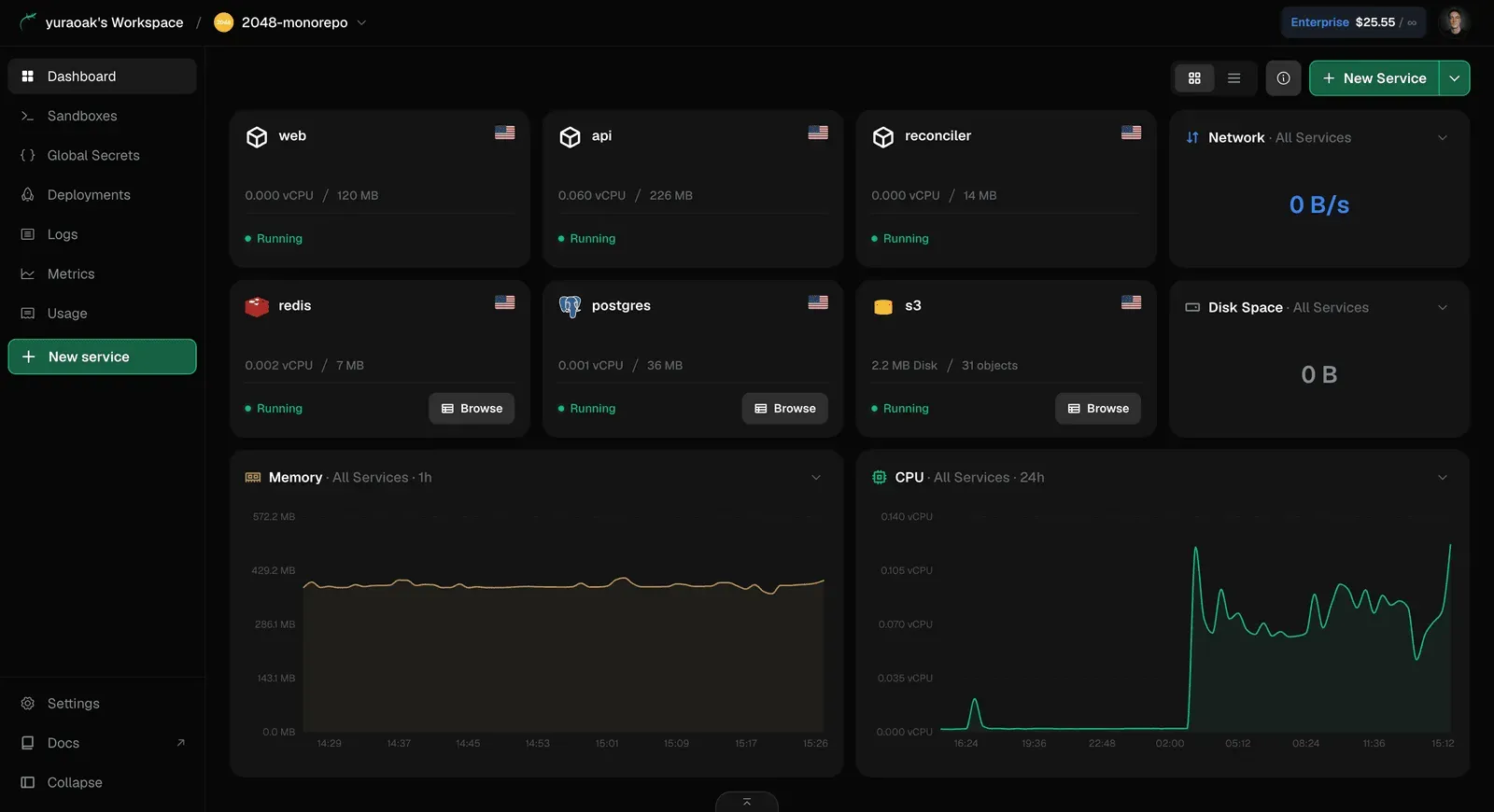
Lizard provides fully managed versions of the three most commonly used cloud infrastructure services: PostgreSQL, Redis, and S3-compatible object storage. These can be provisioned with a single command, and they automatically connect to the deployed application through environment variables. Developers can spin up a database, cache, and file storage in seconds, which is especially valuable for teams building modern microservices or AI-powered applications that require multiple data stores. The dashboard shows real-time usage metrics for each resource, including CPU, memory, and disk, giving developers granular visibility into their infrastructure.
Agent-First CLI with Machine-Readable Output
The command-line interface is designed entirely around the needs of AI agents. All commands output structured data, such as JSON, which can be parsed by tools like Claude Code or Codex without additional processing. Deploy events, logs, and status information are all emitted in a format that an agent can consume directly. This enables a powerful workflow: a developer can instruct an agent to 'deploy the latest changes to staging,' and the agent will run the Lizard CLI, parse the output, and take appropriate actions, such as fixing build errors or rolling back a failed deployment. The CLI also includes sandboxing capabilities, which allow agents to run code in isolated environments and receive typed results rather than raw stdout.
Live Logs and Metrics Built In
Observability is not an afterthought on Lizard. Every service includes live, streaming logs that are accessible both through the dashboard and the CLI. Logs are structured and tagged by service, timestamp, and level, making them easy to filter and analyze. In addition, the platform tracks request metrics, CPU usage, memory consumption, and other key telemetry for every deployment. This is particularly useful for AI agents that need to diagnose issues by examining logs and metrics. Instead of requiring an external monitoring solution, Lizard includes these tools out of the box, reducing the number of services developers need to manage.
Per-Second Billing on Measured Usage
Lizard's pricing model is a standout feature. Instead of paying for a fixed-size VM or container that is often idle, users are billed per second for the actual CPU, memory, and egress their applications consume. The platform uses a technique to 'park' idle vCPU at a near-zero baseline and can evict memory pages that the application isn't using, meaning that a low-traffic app might only cost a few cents per day. The dashboard includes a detailed cost breakdown, showing exactly how much each resource contributes to the monthly bill. This transparency is a boon for cost-conscious startups and independent developers who have been burned by unexpectedly high cloud bills.
Isolated Containers and Security
Every deployment runs in its own secure, isolated pod, which ensures that applications do not interfere with one another. Lizard also supports restoration of deleted services, databases, and projects, a feature that is surprisingly rare in the PaaS space. For larger organizations, the Enterprise plan adds SOC 2 and HIPAA compliance, SSO/SAML authentication, role-based access control, and audit logs. This makes Lizard viable not only for indie hackers but also for companies with strict security and compliance mandates. The isolation model, combined with the ability to run worker processes and background jobs, provides a reliable foundation for production workloads. For more technical details, developers can explore the official documentation.
How It Works
The typical Lizard journey begins with a visit to the website and a click on 'Try for free.' Signup is straightforward, and the free plan includes $5 of credit for the first month, no credit card required. Once logged in, the user is presented with a dashboard that lists applications, databases, and resources, along with a friendly terminal interface that mirrors what a developer might see in their local environment.
From the dashboard, the fastest way to get started is to install the CLI locally or within an agent session. The command npm i -g @lizard-build/cli installs the tool, and authentication is handled with a single command that opens a browser for login. With the CLI ready, a developer can create a new app by running lizard up in the root of their project. Lizard will analyze the codebase, determine the stack, and build a containerized version of the app. The output is streamed to the terminal in a readable, structured format, showing each build step, deployment status, and the final live URL. If a database is needed, a command like lizard create postgres provisions a managed PostgreSQL instance and automatically injects its connection string into the app's environment.
For AI-powered workflows, integration is seamless. In Claude Code, for example, the developer can mention a task like 'deploy this application to production' and the agent will invoke the Lizard CLI, parse the output, and handle any issues that arise. The machine-readable schema for logs means the agent can read application logs directly from the CLI and use them to debug errors. It can even deploy additional resources, like Redis or S3 buckets, on the fly. The developer can also leverage Lizard's sandboxes, which are isolated environments for running code, and receive structured results that are easier for agents to consume than plain text.
Once the app is live, monitoring and scaling are handled through the dashboard. Users can view real-time metrics, stream logs, and adjust resources without downtime. The billing page provides a transparent breakdown of usage, and the per-second pricing means that idle resources are effectively free. For more complex workflows, teams can set up staging and preview environments, configure custom domains, and manage secrets through the CLI or dashboard. The overall experience is fast, and the platform is clearly designed to keep human input to a minimum.
Use Cases
Lizard appeals to a wide range of developers, from hobbyists to enterprise teams. Here are a few concrete scenarios where the platform shines.
Solo Developer Prototyping with AI Agents
A freelance developer is using Cursor to build a SaaS product. They have an idea, and the AI agent writes most of the code. With Lizard, the developer can deploy the application directly from their agent, provision a Postgres database, and set up Redis for caching, all without leaving their editor. The per-second billing is ideal for a solo project that might only see a handful of requests per day, keeping costs under a few dollars per month. When the agent introduces a bug, it can read the logs and fix the issue automatically, turning the developer into a project manager rather than a systems administrator.
Startup Migrating from Railway
A small team has been running their MVP on Railway but has grown frustrated with the lack of per-second billing and the complexity of managing multiple services. They decide to migrate to Lizard, and because Lizard's skill is available, they can instruct Claude Code to perform the migration. The agent redeploys their services, creates new Postgres and Redis instances, copies environment variables, and imports existing data. The team now enjoys lower costs and a more transparent billing structure, while also gaining access to agent-friendly features that will help them scale their development velocity.
Data Heavy Application with Object Storage
An independent developer builds an image processing API that stores user uploads in S3 and relies on Redis for queueing. Using Lizard, they create an object storage bucket and a Redis instance with one command each, and the SDK components are automatically wired to the app. The live metrics show exactly how much CPU and memory the service uses, and the cost breakdown helps the developer keep the project affordable. The isolated container model also ensures that the API performs consistently even as traffic fluctuates.
Security Conscious Enterprise
A mid-sized company needs to deploy internal tools and client-facing services while complying with SOC 2 and HIPAA. Lizard's Enterprise plan offers the required compliance attestations, along with SSO/SAML and audit logs. The team can enable role-based access control to ensure only authorized employees can modify infrastructure. Because Lizard can restore deleted services and databases, the platform provides an extra layer of safety for critical production environments. This makes Lizard a credible choice for organizations that must balance innovation with regulatory requirements.
Pricing & Value
Lizard offers a tiered pricing structure designed to accommodate developers at every stage. The exact details are available on the pricing page, but the site highlights a few key tiers. The Free plan includes $5 of credit for the first month, allowing new users to try the platform without a credit card. This generosity is notable, as it gives users enough runway to deploy a real application and experience the platform's benefits. The Hobby plan, priced at $5 per month, is intended for side projects and includes a baseline amount of resources, presumably with per-second overage billing. The Pro plan targets professional developers and startups, offering higher limits and additional features. The Enterprise plan adds compliance certifications, SSO, and audit logs, with custom pricing.
The value proposition is anchored on the per-second billing model. Instead of paying for a reserved instance that sits idle, users only pay for what they consume. For example, a small web app with low traffic might cost only a few dollars per month on Lizard, whereas the same app on a traditional cloud provider could cost substantially more. The platform's own cost comparison tool suggests that Lizard is roughly 41% cheaper than an equivalent AWS setup. Of course, users should be mindful of their specific usage patterns, but the transparency of the billing dashboard makes it easy to monitor and predict costs. Compared to similar platforms like Fly.io or Render, Lizard's pricing appears competitive, and the free credit makes it a low-risk option to test.
Frequently Asked Questions
How does deployment from Claude Code, Codex, or Cursor work?
A developer can instruct an agent to deploy with Lizard. The agent installs the CLI (npm i -g @lizard-build/cli), runs lizard up, and receives machine-readable output for every command, deploy event, and log line. When a deploy fails, the agent can read the reason and fix it instead of pasting errors back.
Is a credit card required to start using Lizard?
No. The Free plan includes $5 of credit for the first month with no card on file. A card is only required when moving to a paid plan.
What is the typical cost of running a small application on Lizard?
Very little while idle. Lizard bills per second on measured usage, so an idle app's vCPU sits parked at near-zero, and memory pages are evicted when not in use. The $5/month Hobby plan covers a typical side project with room to spare.
Which languages and frameworks are supported?
Lizard supports a wide range of languages and frameworks via lizardpack. It detects Node, Python, Go, Rust, Ruby, PHP, Java, static sites, and more, and writes a real multi-stage Dockerfile that is readable and editable.
Can applications be migrated from Railway, Render, or Heroku?
Yes. Using a Lizard skill, an agent can redeploy services, provision databases, carry over secrets, and import data. The platform supports workers, staging environments, instant rollbacks, and live logs.
Does Lizard offer SOC 2 or HIPAA compliance?
Yes, on the Enterprise plan, along with SSO/SAML, role-based access control, and audit logs.
Final Verdict
Lizard is a breath of fresh air in the PaaS market, built with an uncompromising focus on AI-native workflows. Its per-second billing, managed databases, and agent-readable CLI make it an exceptional choice for developers who are already leveraging AI coding tools. The easy deployment process and generous free tier lower the barrier to entry, while the transparent pricing provides clarity that many legacy clouds lack. However, the platform is still relatively new, and companies with deep legacy integrations may find the migration effort nontrivial. Additionally, while Lizard supports a broad range of languages, some edge cases in build automation may require manual tuning. For individual developers, startups, and forward thinking teams that want to stay ahead of the curve, Lizard is a platform worth serious consideration. The ability to hand off infrastructure management to an AI agent is not just a gimmick, it is a genuine productivity multiplier. Those who adopt Lizard now will be well positioned as the software development industry continues its shift toward agentic workflows. The company blog offers insights into the roadmap.
Pros & Cons
Pros
- Deep AI agent integration with machine-readable schemas for commands, deploy events, and logs, making it a native fit for Claude Code, Codex, and Cursor workflows.
- Managed Postgres, Redis, and S3 are provisionable in a single command, with automatic connection to deployed apps, eliminating manual infrastructure setup.
- Per-second billing based on measured CPU, memory, and egress, which can reduce costs significantly for idle or spiky workloads compared to reserved-instance pricing.
- Every deployment runs in an isolated container with automatic stack detection via lizardpack, supporting a wide range of languages and frameworks including Node, Python, Go, Rust, Ruby, PHP, Java, and Docker.
- Built-in live logs, metrics, and deploy history with rollback capabilities, all accessible through the dashboard and CLI, plus a generous free tier with $5 credit.
Cons
- The platform appears to be relatively new and less established than competitors like Railway or Render, which may concern teams looking for long-term stability.
- Pricing for managed databases and advanced features like SOC 2 compliance is only available on higher-tier plans, which could be a blocker for small startups with compliance requirements.
- The reliance on AI coding agents as the primary interface may have a learning curve for developers who are not yet using tools like Claude Code or Codex.