KROCK.IO is video review software for creative teams with frame-accurate comments, version comparison, and unlimited reviewers at no extra cost.
What is KROCK.IO?
KROCK.IO is a video review and media collaboration platform designed for creative teams that need to upload, share, review, and approve video content in one centralized workspace. The product aims to eliminate the chaos of email threads and scattered feedback tools by providing frame-accurate commenting, version comparison, and approval workflows. It is built for video production companies, advertising agencies, animation studios, and content creators who want to reduce review cycles and speed up project completion. Unlike many competitors that charge per reviewer, KROCK.IO emphasizes unlimited reviewers and no per-user fees, which makes it a compelling option for teams that need to involve many stakeholders in the approval process. The platform also extends beyond video review with features for audio annotation, online proofing, storyboard creation, and project management, positioning itself as a broader creative collaboration hub rather than just a feedback tool.
Key Features
Frame-Accurate Commenting
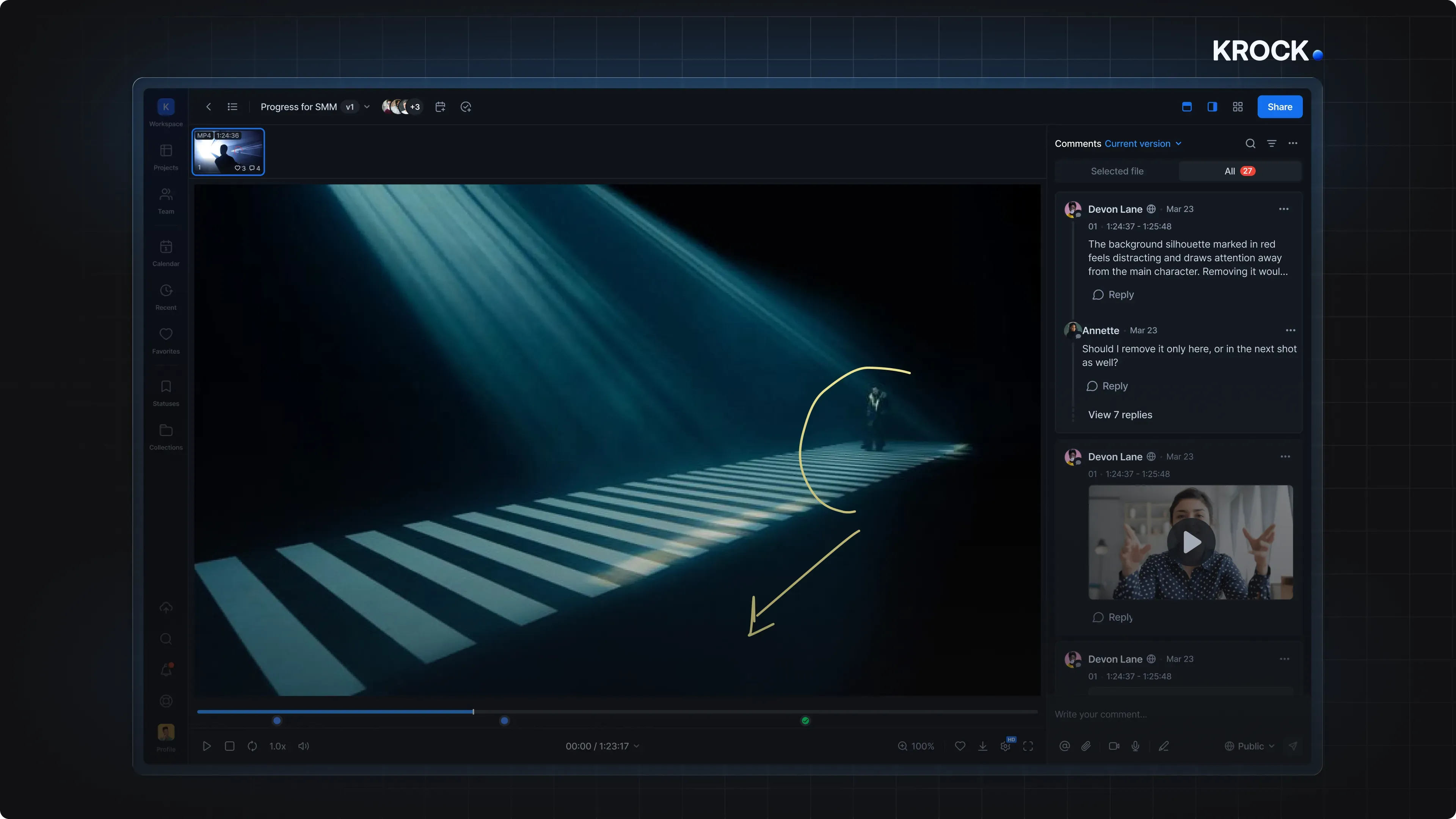
The core of KROCK.IO is its frame-accurate commenting system. Reviewers can pause a video at any frame, drop a comment, and attach it to that exact moment. This removes ambiguity from feedback, as stakeholders can point to the precise time code and even draw on the frame to illustrate their point. The platform supports text, drawings, and attachments, making it easy to communicate visual changes, timing issues, or creative direction without lengthy email chains.
Version Comparison Tools
Keeping track of revisions is a major pain point in creative workflows. KROCK.IO addresses this with two distinct comparison modes. Overlay mode lets reviewers slide a divider across the screen to visually compare two versions of an image or video frame side by side. Auto-compare mode automatically detects visual differences and highlights them with color overlays, so no change goes unnoticed. This is particularly useful for ensuring that requested revisions are actually implemented in the next iteration.
Unlimited Reviewers
One of the strongest marketing points of KROCK.IO is that it does not charge per reviewer. Clients, account managers, directors, and other stakeholders can be invited to review content without adding to the subscription cost. This is a significant departure from many competing tools that nickel-and-dime teams based on seat count. For agencies that regularly involve external clients in the approval process, this pricing model can lead to substantial savings and fewer administrative headaches.
Editing Software Integrations
KROCK.IO offers plugins for several major video editing applications, including Adobe Creative Cloud, DaVinci Resolve Studio, and Apple Final Cut Pro. These integrations allow editors to sync the playhead to time-coded comments, import markers and comments directly into their timeline, and even remove markers with a single click after making the necessary changes. This creates a smooth feedback loop between the review platform and the editing suite, minimizing context switching and helping editors stay in their creative flow.
Storyboard and Animatic Tools
Beyond reviewing finished video, KROCK.IO includes a storyboard creator and animatic tools that help teams plan projects in the early stages. The storyboard creator allows users to build visual narratives frame by frame, while the animatic feature lets them add motion and timing to those boards. There is also a Storyboard AI tool that can generate storyboard panels from prompts, which can speed up pre-production and help teams explore visual ideas quickly. These tools make KROCK.IO a more complete production companion rather than just a review tool.
Project Management and Board View
KROCK.IO provides project management features with a board-based interface. Teams can plan projects, track progress, and organize tasks in a visual kanban-style layout. This helps keep all phases of production, from scripting and storyboarding to final approval, in one place. The board view is designed to integrate with the review workflow, so creative assets and the tasks associated with them are not siloed. This reduces the need to juggle multiple tools and keeps the entire creative pipeline visible to the whole team.
How It Works
The user journey with KROCK.IO starts with signing up for a free trial or free plan, which requires no credit card. After creating an account, users can set up a workspace, invite team members, and create projects. Uploading media is straightforward: video files, images, and audio can be dragged into the platform, and they are transcoded for smooth playback across devices. Once media is uploaded, project owners can share a link with unlimited reviewers, who do not need an account to leave comments in many cases, though creating an account enables more advanced features. Reviewers play the video and add comments at specific frames, either as text, drawing, or attachments. The owner then sees all feedback organized by timestamp and can respond, resolve comments, or upload new versions. With the version comparison tools, the team can visually verify that all requested changes were made in the latest revision. After all feedback is addressed, the project can be marked as approved. For editors using KROCK.IO's integrations, comments flow directly into the editing timeline, allowing them to address issues without leaving their editing software. This entire loop, from upload to approval, is designed to be faster and more organized than traditional email-based review processes.
Use Cases
Video Production Companies
A video production company working on a commercial can upload a rough cut and invite the client, creative director, and post-production supervisor to review it. Each stakeholder can leave frame-specific comments about pacing, color, sound, or visual effects. The editing team then uses the DaVinci Resolve or Adobe plugin to import these comments directly into the timeline, making the revision process highly efficient. The company reduces the number of approval rounds and delivers the final cut on schedule.
Animation Studios
Animation teams often need to review storyboards, animatics, and individual shots. KROCK.IO's storyboard creator and animatic tools allow them to plan scenes and then share those assets for feedback. The frame-accurate commenting is especially valuable for animation, where a single frame change can be critical. Studios can also use the auto-compare mode to show how a shot has evolved from storyboard to final render, keeping clients aligned with the creative vision.
Advertising Agencies
Agencies frequently manage review cycles that involve multiple internal departments and external client contacts. With unlimited reviewers, the agency can invite everyone who needs to sign off on an advertisement without worrying about rising costs. The project management board helps track deadlines and tasks across campaigns. By centralizing all feedback and approvals, the agency shortens its turnaround time, which is a competitive advantage when clients are racing to launch.
Remote Creative Teams
Distributed teams spread across different time zones can use KROCK.IO to maintain a single source of truth for creative work. A motion graphics designer in one city can share a work-in-progress with a copywriter and sound designer elsewhere. Since comments are attached to specific frames, there is no confusion about which part of the video the feedback refers to, and everyone stays on the same page asynchronously. This reduces the number of sync meetings and allows projects to progress around the clock.
Pricing & Value
KROCK.IO offers a free trial that requires no credit card, and the homepage clearly states that a free plan is available. The exact pricing tiers are not fully detailed on the main page, but the platform mentions scalable plans ranging from per-seat pricing to unlimited reviewer options. The pricing page provides a breakdown of what each tier includes, and the value proposition is clear: teams with many external reviewers can save significantly by avoiding per-seat fees. For small teams, the free plan may be sufficient for basic needs, while larger organizations can upgrade to get more storage, advanced security, and additional project management features. Given that competitors like Frame.io often charge per reviewer, KROCK.IO positions itself as a cost-effective alternative without sacrificing collaboration depth. However, buyers should carefully compare the specific storage limits and feature availability of each plan, since the unpriced enterprise tier suggests that custom quotes are needed for very large teams.
Frequently Asked Questions
Does KROCK.IO offer a free plan?
Yes, KROCK.IO has a free plan and also offers a free trial that requires no credit card. The free plan is aimed at individuals or small teams who want to test the workflow, while the trial gives access to more advanced features for a limited period.
Can I invite unlimited reviewers to a project?
KROCK.IO advertises unlimited reviewers with no per-user fees, which means that stakeholders can be added without increasing the subscription cost. This is a core differentiator compared to many competing video review tools.
Does KROCK.IO integrate with Adobe Premiere Pro and other editing software?
Yes, KROCK.IO offers plugins for Adobe Creative Cloud, DaVinci Resolve Studio, and Apple Final Cut Pro. These integrations allow editors to sync time-coded comments directly into their timelines and manage markers efficiently, as detailed on their integrations page.
Is KROCK.IO suitable for small teams or freelancers?
The free plan makes it accessible to solo creatives and small teams with basic review needs. However, the full value of the platform is realized when multiple stakeholders are involved in the review cycle, which is more common in agencies and production houses. Small teams can start free and scale up as their projects grow.
How does KROCK.IO compare to Frame.io?
Both platforms offer frame-accurate commenting and version control for video review. KROCK.IO sets itself apart with unlimited reviewers and no per-seat fees, plus built-in storyboard and project management tools. The choice between the two often comes down to pricing structure and which integrations matter most to the team. For an in-depth comparison, the company has published a detailed breakdown of KROCK.IO versus Frame.io on their blog.
Final Verdict
KROCK.IO is a robust video review and collaboration platform that addresses real pain points in creative production workflows. Its frame-accurate commenting, version comparison modes, and generous unlimited reviewer model make it particularly attractive for agencies and production companies. The inclusion of storyboarding, animatic, and project management tools adds value, positioning KROCK.IO as an all-in-one workspace rather than just a review tool. The main limitations are the lack of transparent pricing details on the homepage, which requires deeper investigation, and the fact that the platform may feel overwhelming for users who only need simple feedback collection. Overall, KROCK.IO is a strong contender for teams that want to speed up approvals, reduce creative bottlenecks, and avoid paying per reviewer. Anyone evaluating video review software for their organization should give KROCK.IO a serious look, especially if they work with external clients and need an efficient, collaborative workflow.
Pros & Cons
Pros
- Frame-accurate commenting with time codes and drawing tools provides precise, actionable feedback for creative teams.
- Unlimited reviewers with no per-user fees eliminate the cost barrier for involving clients and large stakeholder groups.
- Overlay and auto-compare version modes make it easy to spot visual changes across revisions, reducing miscommunication.
- Native integrations with Adobe, DaVinci Resolve, and Final Cut Pro streamline the feedback loop directly inside editing suites.
- All-in-one platform includes storyboarding, animatic, and project management tools, covering pre-production to final approval.
Cons
- Pricing details are not fully disclosed on the homepage, requiring users to visit the pricing page or contact sales for complete information.
- The breadth of features can be overwhelming for individuals or small teams that only need basic video feedback.
- No self-hosted or open-source option exists, meaning teams must rely on the cloud platform and its uptime.