GeckoStats is privacy-friendly web analytics that ties every visit to revenue, revealing which campaigns actually deliver paying customers.
What is GeckoStats?
GeckoStats is a web analytics platform that links every visitor session to the revenue it eventually generated. Rather than stopping at traffic counts, it walks a person from the first tagged click through to checkout and then reports which channel, campaign, search query, or AI assistant produced the payment. The gap it fills is straightforward. Conventional analytics tools answer how many people showed up, while the commercially decisive question is which of those visits turned into money. Small product teams commonly stitch a traffic tool together with a payment dashboard and guess at the rest.
The product targets indie software builders, newsletter operators, and lean ecommerce teams. It positions itself against Plausible, Fathom, Simple Analytics, Umami, DataFast, and Google Analytics, and the site publishes direct comparison pages against each of them. The core argument is the combination of cookieless measurement with payment webhooks, which lets attribution survive the multi week gap between a social post and a purchase.
Key Features
Revenue attribution with named sources. Every payment recorded through a connected provider is matched to the visit that preceded it, and the dashboard prints a dollar figure beside each channel, referrer, campaign, and page. A split bar list shows visitors and revenue in two colours, so a channel that brings volume but no money is immediately visible next to one that converts.
Tagged campaign reporting. A utm_campaign link per tweet, article, podcast episode, or newsletter issue appears by name in a campaigns table that lists visitors and revenue on the same row. Credit goes to the last visit that arrived from a real source, which means a launch tweet still claims the sale when the buyer returns directly a fortnight later.
Individual customer journeys. Opening a visitor profile reveals a timeline running from the first anonymous pageview to the payment, complete with timestamps, session duration, referrer, device, operating system, browser, and the ordered list of pages and goals inside each session. The header summarises first source, visit count, total spend, and time to first payment.
Search Console reporting sorted by money. After a one time connection, the platform lists every query the site ranks for alongside clicks, average position, and an apportioned revenue figure. Ranking is by earnings rather than volume, which surfaces the terms that fund the business instead of the ones with the largest impression counts.
AI crawler tracking. Crawlers do not execute JavaScript, so a tracking script cannot see them, and GeckoStats collects that traffic at the server level instead. The dashboard names GPTBot, ClaudeBot, PerplexityBot, and Gemini, counts the pages each read, and compares that against the visitors and revenue each service sent back.
Live globe and real time event feed. A rotating globe pins every visitor currently on the site, while a feed streams pageviews, goal completions, and payments as they land, with an optional sound cue for sales.
MCP server with 26 read only tools. One command registers the endpoint with Claude Code, a connector handles ChatGPT, and a single settings entry covers Gemini CLI and Cursor. The tools span overview, sources, pages, goals, funnels, customers, search queries, releases, and the live view, and each key is issued per website and revocable from settings.
Nine further capabilities on every plan. Goals and funnels, one click filters that cascade through the whole dashboard, subscription and MRR reporting by source, churn and lifetime value, alerts for stalled tracking or falling revenue, deployment markers posted with a curl command, week by week retention, PNG export of any period, and a cookieless measurement model.
How It Works
Onboarding follows a short sequence. A new account adds a website, receives a 6.6 KB gzipped script with no dependencies, and pastes it into the site template. Teams wanting to sidestep ad blockers can serve that script from their own domain with a one line rewrite. From there a payment provider is connected once, either through the ready made webhook for Stripe, Dodo Payments, Polar, or Creem, or through a single API call that carries an amount and a visitor identifier.
Optionally, an identify call attaches an email address to a visitor, which tightens matching when webhook data arrives without a client side identifier. Goals are defined by pointing at a button click or a signup action, and funnels are assembled by ordering those goals into a sequence.
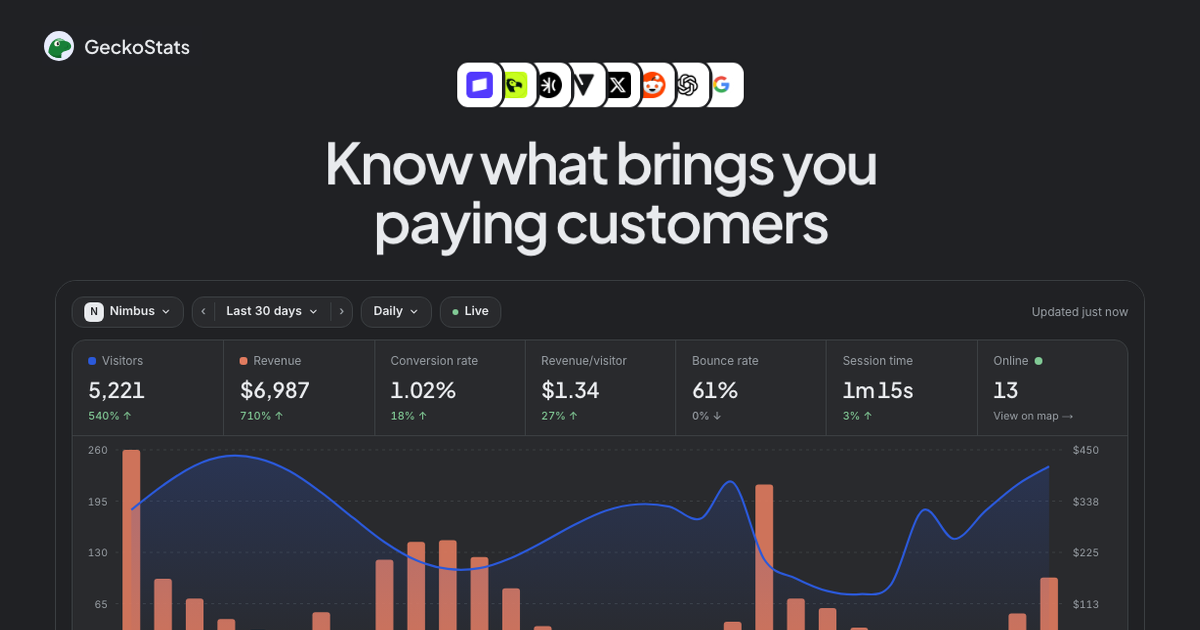
Daily use centres on the overview screen. Visitors, revenue, conversion rate, revenue per visitor, bounce rate, and session time sit in one strip above a dual line chart of traffic against income. Clicking any row, whether a source, a country, a campaign, or a page, filters the entire dashboard, which makes a single spike traceable back to the post that caused it. Curious readers can explore the full interface through the live demo before committing.
Search Console is linked once through Google OAuth. Release markers are posted from a continuous integration pipeline so a traffic dip can be read against what shipped that day. Developers then register the MCP endpoint with an AI client, paste a scoped key, and query the same numbers conversationally. An agent asking which page earned the most last week receives the same rows the dashboard would draw, not a summary generated from a separate data copy.
Use Cases
A solo founder launching on social channels. A tagged link goes into each post, and two weeks later the campaigns table shows which thread produced three subscriptions and which produced nothing but clicks. The founder stops writing the format that generates traffic without revenue and doubles down on the one that converts, without maintaining a spreadsheet.
A newsletter operator selling a paid tier. Each issue carries its own campaign parameter. Because attribution falls back through the checkout visitor identifier, the payment webhook, and finally checkout timing, a reader who opens a Tuesday issue and subscribes on Thursday is still credited to that issue. The operator learns which subject lines and topics actually move revenue.
A small SaaS team watching acquisition quality. Subscription and MRR reporting by source answers a question traffic tools cannot. One channel may deliver twice the visitors at half the retention, and the dashboard exposes that by pairing churn and lifetime value with the original referrer. The team reallocates spend accordingly.
A developer building agent driven workflows. With the MCP server installed in Cursor or Claude Code, a build session can include a live question about which pricing page variant converts better. Because the tools are read only and scoped to one site key, an agent cannot alter settings or delete records, which keeps the arrangement safe inside a production repo.
An ecommerce store using a merchant of record. Stores selling through Dodo Payments, Polar, or Creem get the same attribution as Stripe customers, which matters for businesses that cannot easily run their own payment stack. Products with no supported integration still send payments through the generic API endpoint.
Privacy, Consent and the Technical Stack
The measurement model is the strongest technical argument in the product. By default no cookies are set at all. A visitor is represented as a salted hash of IP address, user agent, and site that rotates every day, and the IP itself is never written to storage. Because nobody can be followed across days or across domains, there is nothing to consent to, and the cookie banner disappears for most sites. A per site switch enables cookie mode for teams that genuinely need cross day identity, with the trade off that consent obligations return.
The tracker weighs 6.6 KB gzipped, has zero dependencies, and loads after the page, so the performance penalty is negligible. Crawler hits are counted separately and do not consume the event quota. The platform is candid about estimation: revenue per search query is printed with an approximate marker because Google never connects a query to an individual, a page is only priced once it has traffic, and Core Web Vitals wait for thirty samples before reporting.
Alerting covers operational risk as well as commercial risk. Tracking that stops, revenue that drops, organic clicks that fall, a page that loses its index status, or a query that slips five positions all trigger a notification. Combined with release markers, an alert can usually be matched to a specific deploy within minutes.
How GeckoStats Compares
Against Plausible and Fathom, the differentiator is money. Both competitors are excellent, fast, privacy respecting traffic tools, and neither attempts to reconcile a payment with the session that caused it. GeckoStats does, at a slightly higher entry price.
Against Google Analytics 4, the argument is simplicity and consent. GA4 offers a far deeper event model and free volume, but the interface demands expertise and the consent banner is unavoidable for European audiences. GeckoStats trades modelling depth for legibility.
Against Umami and Simple Analytics, the split is philosophical. Umami can be self hosted for teams that want total data ownership, whereas GeckoStats is a hosted service with no documented self hosted path. Simple Analytics is closer in spirit but again stops at traffic.
Against DataFast, the overlap is largest, since both chase revenue attribution for small software businesses. GeckoStats leans harder into adjacent surfaces such as AI crawler reporting, Search Console revenue weighting, and the MCP server, which is an unusual inclusion at this price point. The comparison pages are worth reading precisely because they concede where each rival wins.
Pricing & Value
Two tiers sit on a shared event ladder that runs from 25K to 10M events a month. Starter begins at $17 per month for 100K events, one website, and a single user. Growth begins at $35 per month for the same 100K events but raises the ceiling to 30 websites and 30 team seats. Annual billing removes roughly 17 percent. Every plan opens with seven days free, cancellation is self service, and prices exclude VAT where applicable.
Each tier includes every provider integration, Search Console, the AI assistant, the MCP server, real time reporting, the live globe, user profiles, funnels, revenue tracking, and Core Web Vitals. Going over quota does not truncate data; the dashboard keeps counting and a note suggests the next tier, with two consecutive overage months prompting a required upgrade.
Value is strongest for a single site operator who needs attribution more than traffic depth. The Growth tier is where multi product teams and small agencies land, and the jump from one site to thirty for an extra $18 is generous. Full details are available on the published pricing page. Teams already using Stripe can review the Stripe integration to judge setup effort.
Frequently Asked Questions
Does GeckoStats offer a free trial? Yes. Every plan opens with seven days free, and the subscription can be cancelled at any point before the trial ends without charge.
What counts as an event in the monthly quota? A pageview, a goal such as a click or signup, or a payment. Crawler hits are counted separately and do not consume quota. The ladder runs from 25K to 10M events, and Starter and Growth share the same steps.
Which payment providers work out of the box? Stripe, Dodo Payments, Polar, and Creem each ship with a single webhook setup. Any other provider can post an amount and visitor identifier through one API call.
Can AI assistants read the analytics data? Yes, through an MCP server exposing 26 read only tools. Claude, Claude Code, ChatGPT, Cursor, Gemini CLI, and Grok can each be pointed at the endpoint with a per site key, and the tools cannot change settings or delete records. Data reaches the AI provider only when an agent asks for it in a conversation.
Is a cookie consent banner still required? Not by default. The tracker sets no cookies, stores no IP addresses, and rotates the visitor hash daily, so no consent is needed for most jurisdictions. Enabling the optional cookie mode changes that calculation.
Final Verdict
GeckoStats takes a narrow thesis and executes it carefully. Tying payments to sources, then ranking search queries by the money they produce, converts analytics from a vanity exercise into a budgeting tool. The lack of cookies, the 6.6 KB script, and the honest labelling of estimates suggest a team that understands both privacy regulation and the trust required to publish numbers. The MCP server is a genuine differentiator rather than a marketing line, since it exposes the same read path the dashboard uses.
The limitations are real. Starter caps at one site and one user, which pushes any multi project operator straight to Growth. Revenue per query remains an apportionment rather than a fact. And there is no self hosted option for teams that insist on full data residency. The interface also assumes a commerce model, so publishers with no transactions gain less from the core proposition.
For indie founders, newsletter writers, and small software teams already selling online, this is one of the more coherent revenue analytics products available, and the seven day trial makes evaluation cheap. Teams that only need pageview counts should look at Plausible or Fathom. Anyone who has ever wondered which post actually paid the bills should start here.
Pros & Cons
Pros
- Ties each payment to the channel, campaign, or search query that produced it, including purchases that arrive weeks after the first click.
- Ships ready made webhook integrations for Stripe, Dodo Payments, Polar, and Creem, plus a generic API call for any other provider.
- Runs with no cookies by default using a daily rotating salted hash and never stores IP addresses, which removes the consent banner for most sites.
- Exposes 26 read only tools through an MCP server so Claude, ChatGPT, Cursor, and Grok can query the same numbers the dashboard draws.
- Offers seven days free on every tier and keeps collecting data after a quota overage instead of cutting tracking off.
Cons
- The Starter tier is limited to a single website and one user, forcing agencies and multi product teams into Growth immediately.
- Revenue per search query is only an apportioned estimate, because Google never connects a query to an individual buyer.
- No self hosted deployment is documented, so teams requiring full data residency must rely on the hosted service.