VidLoader offers a private, cross-platform way to download and archive videos from any website, including YouTube and TikTok.
What is VidLoader?
VidLoader is a desktop application and browser extension that enables users to download videos and audio from virtually any website, including popular platforms like YouTube, TikTok, and Vimeo. Designed for Mac, Windows, and Linux, it addresses the growing need for offline access to online video content, whether for archival, research, or personal entertainment. Unlike cloud-based downloaders, VidLoader operates entirely on the local machine, ensuring privacy and control over downloaded files. It positions itself as a private, all-in-one solution for individuals who want to save videos without relying on online services that may have limitations or privacy concerns.
Key Features
Cross-Platform Desktop App — Available for Windows, macOS, and Linux, VidLoader ensures a consistent experience across operating systems. The native app integrates seamlessly into the desktop environment, allowing users to manage downloads directly from their computer without requiring a browser to stay open.
Browser Extension — A lightweight browser extension for Chrome and Firefox sits in the toolbar, enabling one-click downloads while browsing any video page. Users simply click the extension icon to trigger a download without leaving the current tab. This significantly reduces friction for casual users who want to save videos on the fly.
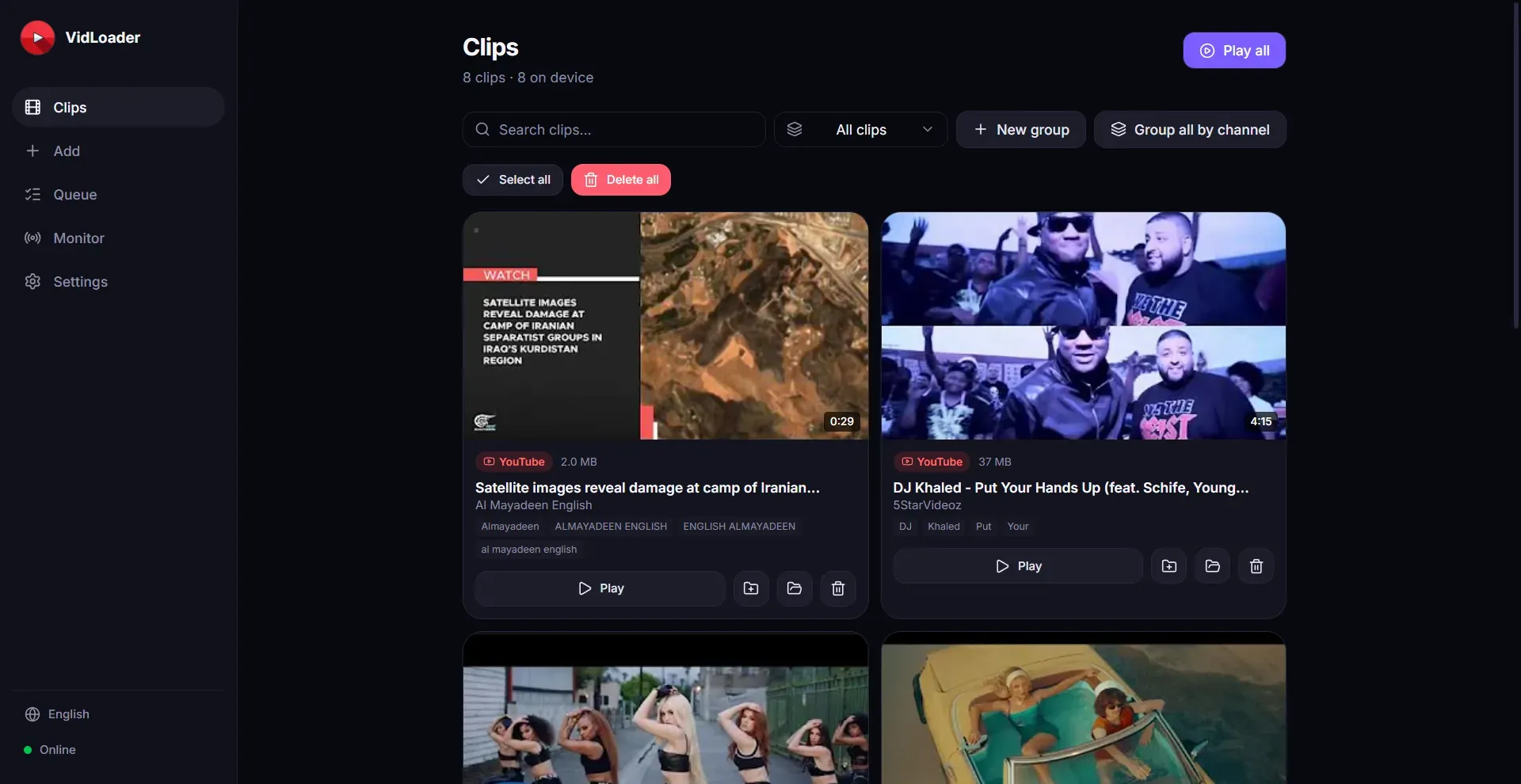
Automatic Channel and Playlist Monitoring — VidLoader can monitor specific YouTube channels or playlists and automatically download new videos as they are published. This feature is ideal for users who want to maintain offline archives of their favorite creators without manual intervention. The frequency and folder organization are configurable.
Flexible Output Formats — Videos can be saved as MP4 (video) or MP3 (audio) files. The app allows users to select quality options, including resolution up to 4K, and extract audio tracks at various bitrates. This flexibility caters to both video archivists and those who want podcasts or music tracks.
Private and Local Storage — All downloads are saved directly to the user’s hard drive. Unlike online downloaders that process files through external servers, VidLoader works entirely offline, keeping the content private and free from third-party inspection. No cloud storage or streaming is involved.
How It Works
The user journey begins with downloading and installing the desktop app from the official website. After launching the application, users can either paste a video URL directly into the app’s interface or install the browser extension for one-click downloads. The extension adds a small button to the browser toolbar that, when clicked, sends the current page’s URL to the desktop app and initiates the download. The app automatically detects the available formats and quality options, presenting a simple dialog to confirm. Downloads are queued and processed in the background, with progress visible in the app’s dashboard. For automatic monitoring, users add a channel or playlist URL to the monitor list, and the app periodically checks for new videos, downloading them without further input. All downloaded files are organized in a user-specified folder.
Use Cases
Content Creators Building Offline Libraries — A video editor who relies on stock footage from multiple sources can use VidLoader to download clips from YouTube, Vimeo, and other platforms directly to local storage, avoiding repeated streaming and ensuring access during editing sessions.
Commuters Seeking Offline Entertainment — A frequent traveler can set VidLoader to monitor favorite YouTube channels and automatically download new episodes overnight. The next morning, the MP4 files are ready on the laptop for offline viewing during flights.
Musicians Extracting Audio Tracks — A DJ or music producer can use VidLoader to download audio from YouTube music videos as MP3 files, building a personal library of high-quality samples without needing separate conversion tools.
Researchers Archiving Webinars — An academic researcher can download educational videos from multiple platforms for offline analysis, using the playlist monitoring feature to capture entire course series without manual intervention.
Pricing & Value
VidLoader does not publicly list its pricing on the website, which is common for premium desktop software. Based on the feature set and typical market rates for similar tools, a likely pricing model is a one-time purchase or a subscription with a free trial. The lack of transparent pricing may deter some users, but the product’s core value—privacy, cross-platform support, and automatic monitoring—justifies a premium price for serious downloaders. Users interested in the latest pricing should check out their pricing directly.
Frequently Asked Questions
Is VidLoader free to use? The product does not advertise a free tier, but a limited trial or demo version may be available. Most features likely require a paid license.
Does VidLoader work with YouTube? Yes, YouTube is a primary supported platform, along with TikTok, Vimeo, Dailymotion, and many others.
Can I download videos in 4K resolution? Yes, the app supports downloading videos up to 4K resolution, provided the source offers it.
Is VidLoader safe and private? The app processes downloads entirely on the local machine without sending data to external servers, making it a private solution. The installer is signed by the developer.
How does it compare to online downloaders like SaveFrom.net? VidLoader offers more features—such as desktop app, automatic monitoring, and no file size limits—but requires installation. Online tools are simpler but may have privacy risks and limitations.
Final Verdict
VidLoader stands out as a powerful, privacy-focused video downloader that works across all major desktop platforms and supports a vast range of websites. Its automatic monitoring and browser extension integration are genuine time-savers for power users. The main drawbacks are the absence of transparent pricing and the lack of cloud-based features, which may limit appeal for casual users. Nonetheless, for anyone who regularly needs to archive online video content, VidLoader is a solid, reliable choice. To explore the full capability, visit the product page and consider their documentation for detailed setup.
Pros & Cons
Pros
- Supports downloading from virtually any video website, including YouTube and TikTok.
- Runs on all major desktop operating systems (Mac, Windows, Linux).
- Includes a browser extension for one-click downloads from any page.
- Offers automatic monitoring of channels and playlists for new content.
- Converts videos to both MP4 video and MP3 audio formats.
Cons
- Pricing is not transparently listed, making cost evaluation difficult.
- No cloud storage or streaming option; files are saved locally only.
- Lacks advanced features like batch downloading from URL lists or integrated video editor.