HuddleMate is a real-time AI meeting assistant that listens to live calls and delivers instant, context-aware answers for interviews, sales and trivia.
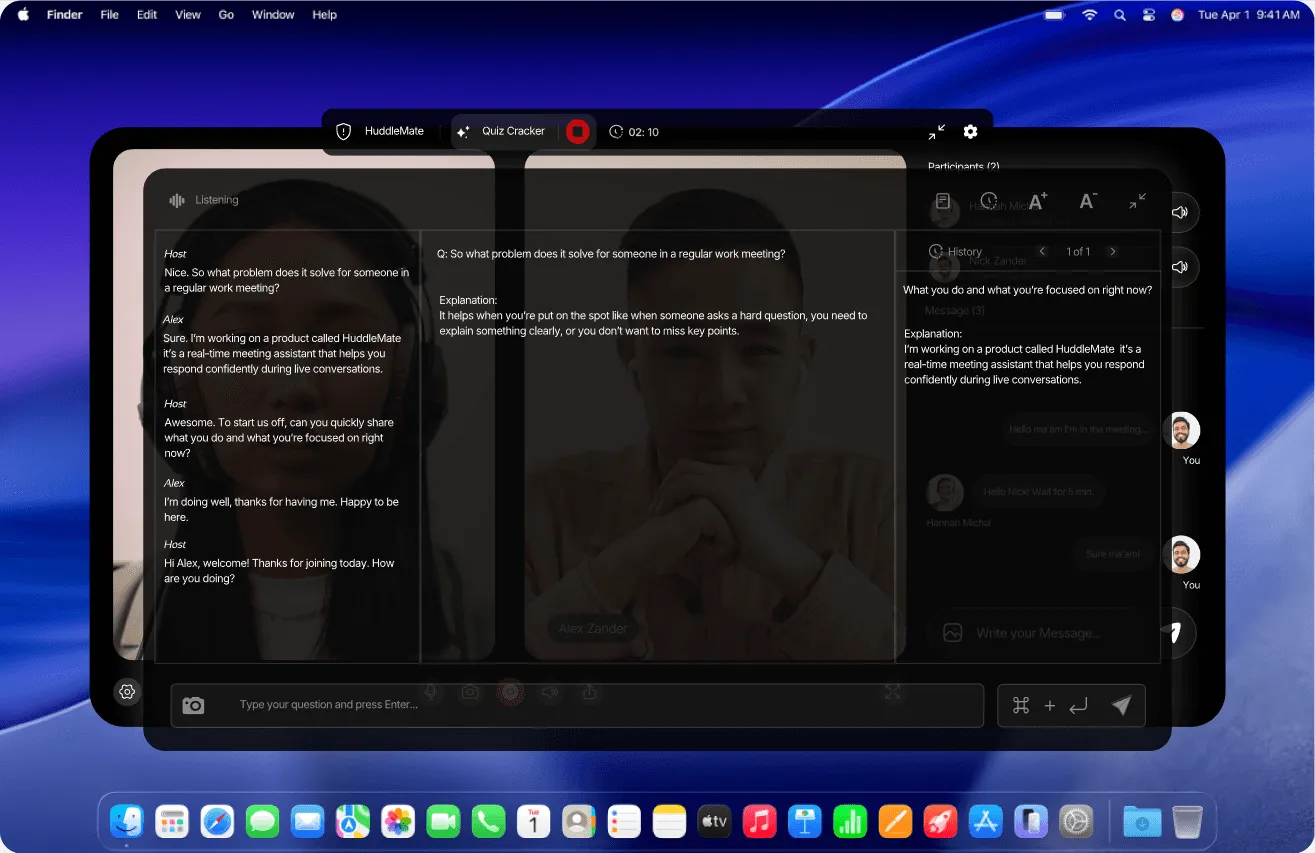
HuddleMate is a real-time AI assistant that listens to live conversations, observes what is displayed on the user's screen, and returns suggested answers within seconds. It was designed for the moments that make people freeze: an interview question that was never rehearsed, a client asking for a figure that has slipped from memory, a prospect raising an objection in the middle of a demo. The platform combines live transcription, optional screen analysis, and a personalized knowledge library so that every suggestion reflects the facts a user actually cares about. Its audience spans job seekers, sales representatives, students competing in trivia, and remote professionals who want to sound composed under pressure.
The tool operates in a crowded category of interview copilots and meeting assistants. Where it attempts to differentiate is on privacy and economics. HuddleMate never joins a call as a bot, never injects an avatar, and never renders an overlay that other participants can detect. It also charges by active assisted minutes rather than through a flat monthly subscription, and purchased minutes never expire. That combination of privacy by default and consumption pricing is the core of the pitch, and it is what makes the product worth examining closely against rivals such as Final Round AI, Cluely, and Parakeet AI.
What is HuddleMate?
HuddleMate is a desktop AI companion that listens to live meeting audio, reads the user's screen, and quietly surfaces suggested responses so the user never has to stall, ramble, or search for information mid-conversation. The problem it addresses is conversational blanking: the physiological freeze that happens when a difficult question arrives before a coherent answer does. That failure mode shows up in job interviews, discovery calls, customer escalations, and even casual trivia nights, and it costs people offers, deals, and credibility.
The product is built for individual professionals rather than IT departments. Job candidates upload a resume and a job description, sales teams load product notes and pricing sheets, and students select a trivia mode that returns short factual answers. Positioning is deliberate: HuddleMate frames itself as the opposite of platforms that park a visible notetaker bot in a calendar invite. Because it runs privately on the user's own machine, other participants see nothing, and the company treats that invisibility as a feature rather than an ethical grey area.
Against alternatives, HuddleMate competes on breadth of meeting types, real-time screen interpretation, structured answer templates such as STAR, and minute-based billing. The site maintains dedicated comparison pages for Final Round AI, Cluely, Parakeet AI, AIApply, and Verve AI, which signals a category in which buyers shop side by side. HuddleMate's argument is straightforward: fewer subscription commitments, more response formats, and no detection risk.
Key Features
Real-time transcription and continuous listening. HuddleMate listens to the entire conversation rather than sampling individual questions. The assistant tracks both the user's own answers and the follow-ups that come afterward, preserving conversational context so that suggestions stay coherent as a discussion evolves. The company markets this as listening to everything, which matters in interviews where a follow-up question only makes sense relative to an earlier answer.
Screen analyzer. Beyond audio, the product captures and interprets the user's display. That means it can reason about a shared document, a coding exercise, a slide deck, or a dashboard that both parties are looking at. For technical interviews and live debugging sessions this is a meaningful differentiator, since audio-only copilots have no visibility into a code editor or a spreadsheet.
Custom knowledge base. Users upload resumes, job descriptions, product notes, pricing details, and talking points before a session begins. The system then grounds its suggestions in those documents, so answers reference the applicant's actual experience or the salesperson's real figures rather than generic advice. The onboarding flow explicitly asks for this material as step two of setup.
Multiple response styles per meeting. HuddleMate offers configurable answer formats. Short mode produces a rapid bullet-style reply for fast-moving calls, while structured templates such as STAR generate a fuller narrative for behavioral interview questions. The site advertises multiple response types within a single meeting, letting users switch depending on how much room a conversation gives them.
Screen-share invisibility. The assistant is designed to remain completely hidden when the user shares a screen. There is no bot participant, no injected avatar, and no overlay visible to others. A slider on the marketing page demonstrates the split between what the user sees, which is the full answer, and what the meeting sees, which is nothing at all. The company describes this as zero detection risk.
Usage-based credits. Rather than a recurring subscription, HuddleMate sells assisted minutes. The free tier grants five minutes every hour, the standard tier is priced at $9.99 per hour of active assistance, and unused minutes do not expire. Enterprise customers can request custom integrations, team seats, and a dedicated account manager.
Works across meeting platforms. Because the assistant listens locally instead of integrating through a calendar or conferencing API, it is platform agnostic. The comparison table lists compatibility with interviews, sales calls, and general meetings, and lists mobile support as an additional capability alongside desktop use.
How It Works
The workflow is intentionally short, and the marketing site reduces it to three steps. First, the user picks a copilot profile. Options include interview mode, trivia mode, and a custom meeting assistant that can be tailored to a specific recurring scenario. Each mode formats responses differently, so the choice determines whether answers arrive as terse facts or as structured stories.
Second, the user loads context. A resume, a job description, meeting notes, a product one-pager, or any document that the assistant should remember is uploaded into the knowledge base. HuddleMate then references that material whenever it generates a reply, which is why onboarding emphasizes preparation over configuration. Nothing technical is required, and there is no calendar sync or browser extension to install.
Third, the user launches a session and joins the meeting as normal. HuddleMate listens in real time, watches the screen, and presents suggested language directly on the user's own display. Sessions are measured in assisted minutes, so a user who activates the assistant for a ten-minute segment of a longer call consumes only that portion. When the session ends, remaining credits stay in the account because purchased minutes never expire.
A typical week for a job seeker might involve uploading updated resume versions before each interview, selecting a response style that matches the company culture, and running two or three sessions. A sales professional might keep a single product knowledge base loaded and launch short sessions before discovery calls. The product does not require daily maintenance, and it does not store transcripts in a way the marketing site advertises as retrievable afterward, which keeps the workflow lightweight but also leaves no post-call review artifact.
Use Cases
Job interviews. A software engineer facing a final-round loop uploads a resume, the job description, and a list of past projects. During the live interview, an unexpected system design question arrives. HuddleMate surfaces a structured outline within seconds, allowing the candidate to speak confidently about trade-offs instead of stalling. The site features a testimonial from a candidate who received an offer after being asked two questions that had not been prepared.
Technical screens with a shared editor. Because the screen analyzer reads the display, a candidate working through a coding exercise can receive contextual hints tied to the actual problem on screen. Audio-only tools cannot see the code, so this scenario is where HuddleMate's screen capture earns its place.
Sales discovery and objection handling. A representative on a pricing call hears a cost objection. HuddleMate draws on uploaded pricing documentation and returns a calm, direct response that keeps the conversation moving. The marketing page cites a scenario in which a prospect raised a pricing objection, the suggested reply landed, and the follow-up meeting was booked.
Trivia and live knowledge games. A lighter use case involves team trivia nights, where the assistant delivers short factual answers while the player is muted, allowing a fast answer when the microphone opens. One testimonial describes winning a round by a single point this way, which illustrates how broadly the company defines its addressable audience.
Customer-facing calls for small teams. Small businesses without a dedicated sales enablement tool can load product notes and objection handling into the knowledge base and use HuddleMate as a lightweight real-time coach, paying only for the minutes actually consumed.
Pricing & Value
HuddleMate structures pricing around active assisted minutes rather than seats. The free tier costs $0 and provides five free minutes every hour, which the company positions as sufficient for testing the product or handling a brief moment of need. No credit card is required, and the free plan still includes real-time transcription, instant AI responses, screen-share invisibility, the screen analyzer, custom knowledge support, and configurable response formats.
The Standard plan is listed at $9.99 per hour and is described as the most popular option, targeted at interviews and important calls. It adds priority support and, critically, minutes that never expire. The Enterprise tier is quoted as a conversation rather than a number, bundling all standard features with custom integrations, enterprise-grade security language, team member invitations, and a dedicated account manager.
The value proposition is honest for intermittent users. Someone who runs two interviews a month spends roughly twenty dollars, far less than the flat monthly fees common among interview copilots. Heavy daily users, however, may find hourly pricing accumulates quickly, and the five-minute hourly ceiling on the free tier is too small for a full interview loop, which limits how much can be validated before committing money. The absence of a published refund policy or a transparent security certification list leaves some procurement questions open for enterprise buyers.
Frequently Asked Questions
How much does HuddleMate cost? The free tier provides five assisted minutes every hour at no cost. The Standard plan costs $9.99 per hour of active assistance with unlimited expiration on purchased minutes, and Enterprise pricing is arranged through a sales conversation.
Will other meeting participants know the assistant is running? No. HuddleMate does not join as a bot, does not inject a visible participant, and does not display overlays to others. It runs privately on the user's device, and the interface is designed to remain hidden during screen sharing.
Which meeting platforms does it support? The product is advertised as working with all major meeting applications, including interview platforms, video conferencing tools, and sales call software. Because it listens locally rather than integrating through a conferencing API, compatibility does not depend on a specific vendor.
Do unused minutes expire? Purchased minutes on the Standard and Enterprise tiers never expire, so credits carry forward indefinitely. Free-tier allowances are granted hourly rather than accumulated.
How does HuddleMate compare to Final Round AI or Cluely? HuddleMate emphasizes pay-per-use pricing, screen analysis, and multi-format answers such as STAR, while positioning itself as invisible during screen sharing. The company publishes direct comparisons on its site, and buyers evaluating the Final Round AI alternative can weigh those differences side by side.
What is the best fit for the product? Job candidates preparing for behavioral and technical interviews, sales representatives handling live objections, and students in trivia or knowledge games are the clearest fits. The company also maintains a dedicated page describing its role as an AI interview assistant.
Final Verdict
HuddleMate is a focused, well-executed take on the real-time assistant category. Its strongest attributes are genuine: listening to the full conversation rather than single questions, grounding suggestions in uploaded documents, interpreting the user's screen for technical scenarios, and remaining invisible during screen sharing. The pricing model earns extra credit for refusing to lock buyers into subscriptions, and minutes that never expire remove the pressure that makes many AI credits worthless within a month.
The limitations are equally clear. Five free minutes per hour is a token allowance that will not carry a full interview, so serious evaluation requires spending. Hourly pricing rewards occasional users and penalizes heavy ones, and the absence of published compliance certifications or a documented data retention policy leaves enterprise procurement with unanswered questions. The design also raises an inevitable question about employer policies, since the product is explicitly built to go unnoticed in interviews.
For job seekers preparing for a small number of high-stakes conversations, sales professionals who want real-time coaching without a permanent subscription, and technically oriented users who value the full feature set around screen analysis and answer formatting, HuddleMate is worth a trial. Teams that need auditable security documentation, or candidates who prefer transparency about AI use in hiring, should look carefully before committing.
Pros & Cons
Pros
- HuddleMate listens to the entire conversation and grounds every suggestion in user-uploaded documents such as resumes, job descriptions, and pricing sheets rather than returning generic advice.
- The assistant runs privately on the user's device with no bot participant or visible overlay, so it stays hidden during screen sharing and carries no detection risk for other attendees.
- Pricing is consumption based at $9.99 per hour of active assistance, and purchased minutes never expire, which removes the recurring subscription commitment common among competing interview copilots.
- The free tier grants five assisted minutes every hour without a credit card and still includes the screen analyzer, custom knowledge support, and configurable response formats.
- Multiple answer styles, including short mode and structured STAR templates, can be switched within a single session so responses match the pace and formality of the conversation.
Cons
- The free allowance of five minutes per hour is too small to validate the product across a realistic interview or sales call, so meaningful testing requires a paid purchase.
- The site claims enterprise-grade security but publishes no SOC 2, ISO, or data retention documentation, which leaves compliance-minded buyers without verifiable answers.
- Advertising that the assistant is undetectable during interviews may conflict with employer policies and recruiting guidelines, limiting adoption in formal corporate hiring processes.