Akita Apps delivers distraction-free productivity tools including Dopamine Destroyer and Hayaku Notes for focused work.
What is Akita Apps?
Akita Apps is a suite of minimal productivity tools designed to help users reclaim focus in an era of constant digital distraction. The platform offers two browser-based utilities: Dopamine Destroyer, a website blocker that eliminates distracting sites with a single toggle, and Hayaku Notes, a rapid note-taking tool for capturing fleeting ideas. Unlike bloated productivity suites that require subscriptions and complex setups, Akita Apps provides clean, lightweight solutions that respect user attention. It targets knowledge workers, students, freelancers, and anyone struggling with information overload who needs practical, no-fuss software.
Key Features
Dopamine Destroyer: Instant Site Blocking This Chrome extension lets users block distracting websites immediately. Instead of elaborate scheduling or guilt-inducing timers, it offers a simple toggle — on or off. The emphasis is on speed and simplicity, removing friction from the act of eliminating temptation. The extension works in the background, intercepting requests to blacklisted domains, and requires no account or configuration beyond initial setup.
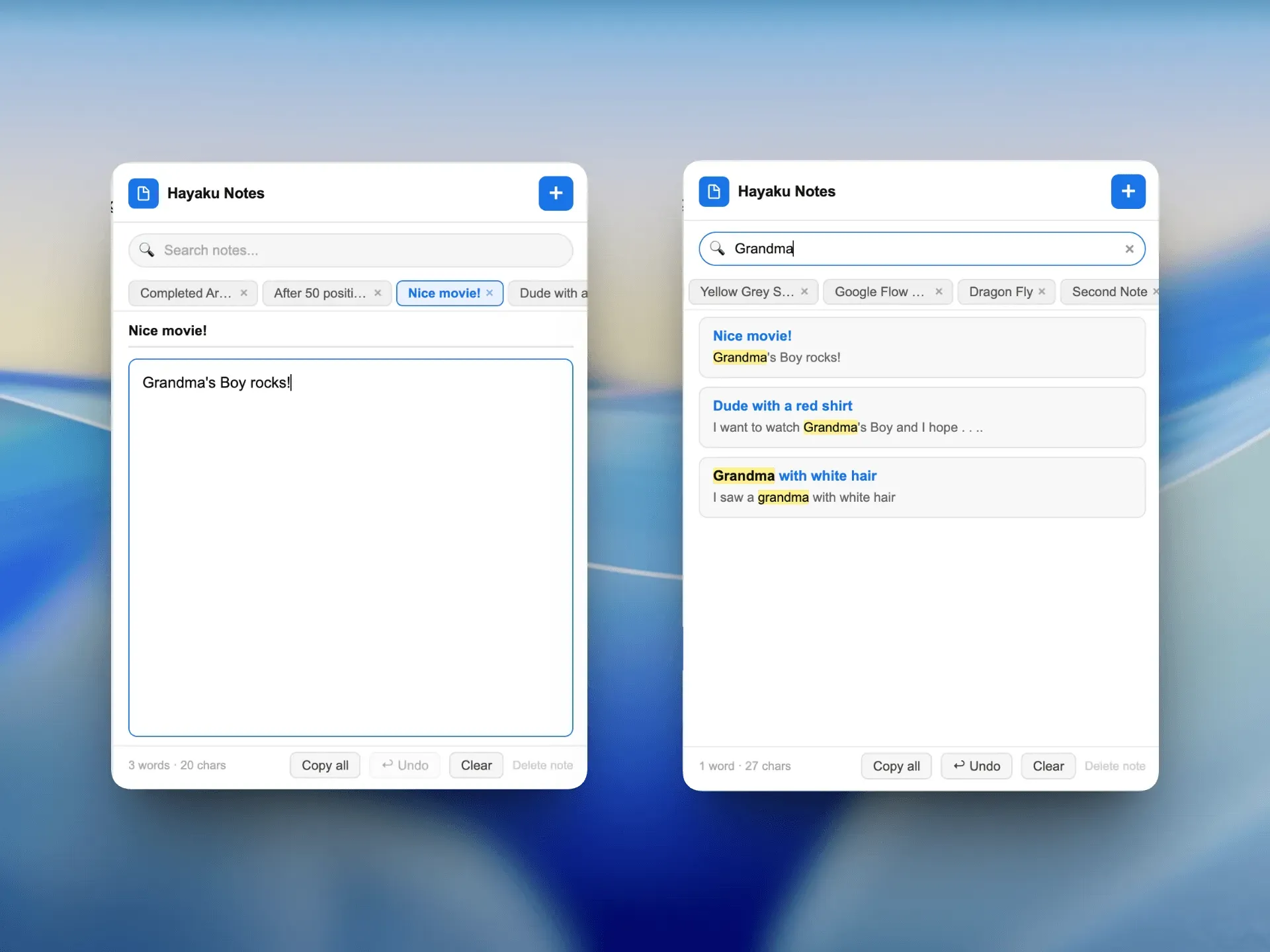
Hayaku Notes: Lightning-Fast Note Capture Hayaku Notes focuses on the moment an idea strikes. With one click, users can jot down thoughts without navigating away from their current tab. The tool prioritizes minimalism: no folders, tags, or formatting options that slow the process. Notes are stored locally or in the cloud (depending on future features), ensuring they are accessible when needed.
No Subscription Model Akita Apps explicitly avoids recurring fees. Users pay once (or access a free tier) and own the software indefinitely. This aligns with their philosophy of removing barriers to focus — financial commitments included.
Browser Extension Architecture Both tools are built as Chrome extensions, meaning they integrate seamlessly with the browser environment. They add minimal overhead, load quickly, and do not require dedicated desktop applications. This choice reduces system resource usage and keeps the user within their primary digital workspace.
Minimal UI Design The interface across both products is stark and utilitarian. No animations, no dashboards, no analytics. The design philosophy is rooted in the idea that the tool itself should be invisible — merely a conduit for the user's intent.
Keyboard Shortcuts To further reduce friction, both extensions likely support keyboard shortcuts for common actions, though not explicitly documented on the landing page. Users can expect standard Chrome extension shortcut customization.
How It Works
The user journey begins by installing the desired extension from the Chrome Web Store or directly from the Akita Apps website. There is no signup required for basic functionality, aligning with the privacy-focused stance. Once installed, the extension adds an icon to the browser toolbar.
For Dopamine Destroyer, the user configures a list of distracting sites during setup. Then, toggling the icon on a given site blocks it instantly; toggling off restores access. The process takes less than a minute. For Hayaku Notes, clicking the icon opens a small text input field. The user types a note and hits enter to save. Notes accumulate in a simple list that can be exported or cleared later.
Daily use involves habitual activation: blocking social media during work hours, capturing a sudden idea without losing context. The extensions run passively, requiring no maintenance. The lack of accounts means no login friction; the lack of sync (currently) means data stays local, which can be a privacy benefit but a portability limitation.
Use Cases
Remote Worker Battling Distraction A remote software developer needs to focus on deep work. They install Dopamine Destroyer to block Reddit, YouTube, and news sites during sprints. The one-click toggle lets them enforce self-discipline without guilt. They pair it with Hayaku Notes to jot down technical insights without switching contexts.
Student Managing Study Time A college student preparing for exams uses Dopamine Destroyer to block social media during study blocks. Hayaku Notes helps them capture lecture takeaways or flashcard ideas quickly. The free (or low-cost) model fits a student budget.
Freelancer Juggling Multiple Projects A freelance writer uses Hayaku Notes to record sudden angles or research tidbits while browsing. Dopamine Destroyer keeps them off clickbait sites during billable hours. The zero-subscription cost appeals to variable income.
Creative Professional Seeking Flow A graphic designer uses the tools to enter a flow state. Dopamine Destroyer removes online distractions, while Hayaku Notes captures design inspiration snippets without breaking concentration. Minimal tools suit a creative workflow.
Pricing & Value
Akita Apps does not publicly list prices on the main landing page, but the site strongly emphasizes "no subscriptions." Based on common patterns for such utilities, Dopamine Destroyer and Hayaku Notes are likely available as free extensions with optional donation or lifetime purchase options. The value proposition is clear: one-time payment for permanent focus tools. Compared to subscription-based competitors like Freedom or Cold Turkey, Akita Apps offers a more affordable, no-strings-attached alternative. Users should check out their products for exact pricing.
Frequently Asked Questions
Is Akita Apps free? The core functionality is likely free, as the landing page does not mention required payments. Some features may be donated or one-time purchase, but the emphasis on "no subscriptions" suggests a free or freemium model.
Do I need an account to use the extensions? No. Both tools operate without user accounts, respecting privacy and reducing friction. Data is stored locally in the browser.
Are there mobile versions? Currently, Akita Apps focuses on Chrome extensions. There is no indication of mobile apps, which may limit use for users who need distraction blocking on phones.
Who is Akita Apps for? It is for anyone seeking minimal, effective tools to improve focus — particularly knowledge workers, students, and remote professionals who spend significant time in a browser.
How do these compare to Freedom or Cold Turkey? Akita Apps is simpler, less feature-rich, but free or lower cost. It lacks scheduling, cross-device sync, and advanced analytics. However, its simplicity may appeal to users overwhelmed by complex settings.
Final Verdict
Akita Apps succeeds in its mission to provide stripped-down focus tools without recurring costs. Dopamine Destroyer and Hayaku Notes are genuinely useful for quick distraction blocking and note capture, respectively. The main trade-offs are limited platform support (Chrome only) and a lack of advanced features like scheduling or sync. For users who want a no-nonsense, budget-friendly productivity boost, Akita Apps is a solid choice. Those needing comprehensive cross-device blocking or rich note organization should look elsewhere. Overall, the suite earns a recommendation for its design integrity and respect for user attention.
To explore the tools further, visit the Hayaku Notes page or contact the team for more details.
Pros & Cons
Pros
- Dopamine Destroyer offers a single toggle to block distracting websites, requiring zero configuration after initial setup.
- Hayaku Notes enables one-click note capture without leaving the current browser tab, preserving workflow continuity.
- The entire suite operates without any subscription fees, aligning with the product's philosophy of removing financial barriers to focus.
- Both extensions are built as lightweight Chrome extensions with minimal UI overhead, ensuring fast load times and low resource consumption.
- The absence of user accounts eliminates login friction and enhances privacy, as all data remains local to the browser.
Cons
- The tools are currently limited to Chrome browser, leaving users of Firefox, Safari, or mobile devices without support.
- Hayaku Notes lacks advanced features like folder organization, search, or cloud sync, which may frustrate power note-takers.
- Dopamine Destroyer does not offer scheduling or recurring blocks, limiting its effectiveness for users who want automated distraction management.