Macy review: a personal AI assistant that lives in iMessage, connecting 500+ apps and texting you proactively. Free during early access.
What is Macy?
Macy is a proactive personal AI that operates entirely within iMessage, connecting to over 500 apps and services to monitor, summarize, and act on your behalf—without requiring a separate app to open. Designed for iPhone users who juggle multiple tools and communication channels, Macy solves the problem of information overload by funneling alerts, messages, and reminders into a single iMessage thread. Unlike traditional AI assistants that wait for commands, Macy texts you first when something needs attention, positioning itself as a hybrid between a chief of staff and a smart notification system. It competes directly with other agentic AI products but differentiates through its zero-app, SMS-native interface.
Key Features
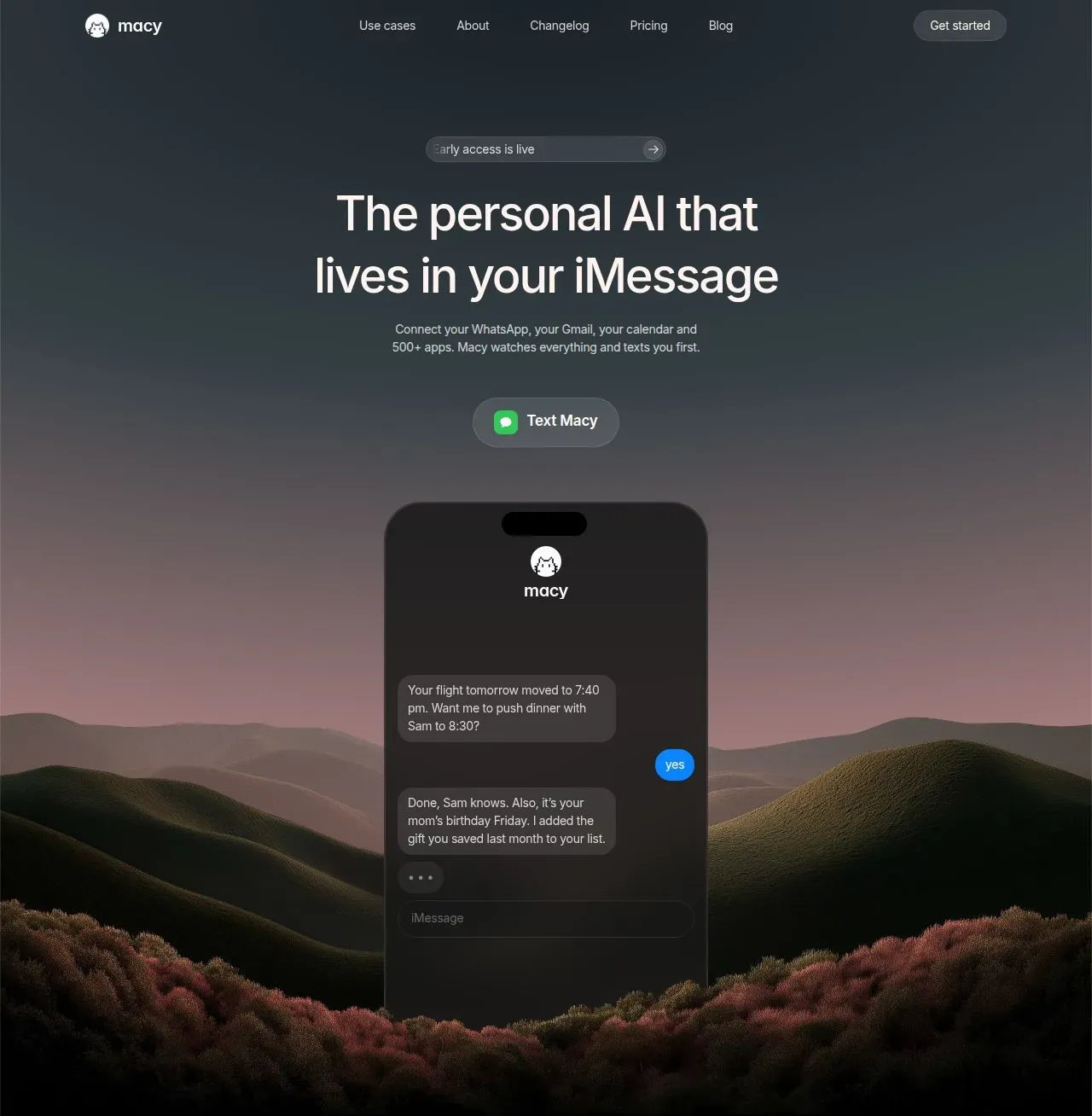
Proactive Notifications: Macy monitors your connected accounts around the clock and initiates conversations when something actionable occurs. For example, a flight delay triggers an immediate text with a suggestion to reschedule dinner. This shifts the user from pull-based app checking to push-based awareness.
App Integration Engine: Through a web dashboard, users link Gmail, Calendar, Google Drive, Slack, WhatsApp, Robinhood, and over 500 other services. Once connected, Macy surfaces relevant information from these sources in the thread without requiring further logins.
Confirmation Gate: Any sensitive action—such as sending a WhatsApp reply, executing a stock trade, or updating a calendar event—requires the user to explicitly reply "yes" before Macy proceeds. This prevents unauthorized or misunderstood commands.
Background Monitoring: Macy runs persistent background jobs that watch your inbox for important emails, your calendar for schedule changes, and your investment portfolio for price movements. Users receive alerts even while sleeping.
Document Retrieval: Users can save files, notes, and contracts to a private drive via text. Macy fetches them on demand by referencing context (e.g., "show me the lease from March 9").
On-Device Generation: Macy can generate stickers, images, and short videos directly in the chat. This extends beyond text-based AI into creative content, useful for sharing with friends or adding personality to conversations.
Language Coaching: For language learners, Macy sends daily quizzes, audio clips, and corrects voice notes sent back—all within the iMessage thread, eliminating the need for separate apps.
How It Works
The user journey begins by texting Macy's phone number, which immediately opens an iMessage thread. No app download or account registration is required. Once the conversation starts, users are guided to a web dashboard where they authorize integrations for Gmail, Calendar, WhatsApp, and others. After setup, Macy begins background monitoring. Notifications appear as incoming texts: a price drop, a flight change, a WhatsApp group summary. The user can reply with natural language to ask questions or approve actions. For example, typing "yes" to a proposed trade executes it via Robinhood's API after a final confirmation. Daily interactions become conversational, with Macy remembering preferences like seat choices or dietary restrictions.
Use Cases
Frequent Traveler: When a flight's departure time shifts, Macy texts the update and asks whether to reschedule a linked dinner reservation. The user replies "yes," and Macy handles both the calendar and the restaurant booking.
Casual Investor: A stock hits a predefined price target. Macy texts a research summary and a proposed trade size. The user reviews and texts "yes" to execute via Robinhood. No need to open a brokerage app.
Busy Professional: After an unread WhatsApp group chat accumulates 200 messages, Macy sends a concise summary and highlights a decision that needs input. The user can dictate a reply that Macy sends on their behalf.
Language Learner: A user studying Spanish receives a daily practice question. They reply with a voice note, and Macy corrects pronunciation and provides a written translation—all inside the same thread.
Pricing & Value
Macy is currently free during early access. The company indicates a future price of around $19 per month, though that figure is not yet locked in. Early adopters will be notified before any billing changes. At this price point, Macy undercuts a human assistant while offering 24/7 availability and deep integration breadth. However, until pricing is finalized, the long-term value proposition remains uncertain. The free period provides ample time to evaluate whether the proactive, thread-based model justifies the subscription.
Frequently Asked Questions
Is Macy free to use? Yes, Macy is free during early access. The planned monthly subscription is approximately $19, but that amount may change. Early users will hear about any updates directly from Macy.
What apps can Macy connect to? Macy integrates with Gmail, Google Calendar, Google Drive, Slack, WhatsApp, Robinhood, and over 500 other services via its web dashboard. Users can also connect custom tools through the platform's API.
How do I start using Macy? Simply text Macy's phone number, which is listed on the website. The first message opens an iMessage thread. No app download, signup form, or waitlist is required.
Can Macy act without my permission? No. All sensitive actions require explicit user confirmation via a "yes" reply. Macy proposes actions but never executes them without approval. This includes trades, messages, calendar changes, and file saves.
Is my data secure with Macy? Every action Macy takes is logged with a full audit trail. The platform uses encryption for data in transit and at rest. Users can revoke app connections at any time from the dashboard.
Final Verdict
Macy's strengths lie in its proactive, thread-based interface and its extensive integration catalog. By eliminating the need to open separate apps for alerts, it reduces friction and cognitive load. The confirmation gate provides a critical safety layer for automated actions. However, the product is currently limited to iMessage on iOS, excluding Android and desktop users. Additionally, because it is in early access, feature stability and pricing are not fully mature. For iPhone owners who want an always-on, text-first executive assistant that connects their digital life, Macy is already compelling and worth trying during the free period. Others may want to wait for broader platform support and a solidified pricing model.
For more details, check out Macy's pricing page and learn about the company on their about page. Read about how Macy handles autonomous actions in their engineering blog post.
Pros & Cons
Pros
- Proactive notifications eliminate the need to manually check multiple apps for important updates.
- Confirmation gate ensures no action is taken without explicit user approval, adding a critical safety layer.
- Over 500 app integrations allow Macy to monitor and act across a user's entire digital ecosystem.
- Zero app download required; the entire experience lives inside iMessage, reducing friction.
- Background monitoring operates 24/7, covering email, calendar, stocks, and messaging platforms.
Cons
- Currently limited to iMessage on iOS, excluding Android, desktop, and web users.
- As an early access product, pricing and feature set are not yet finalized, creating uncertainty.
- Heavy reliance on SMS/iMessage may raise privacy concerns despite audit trail and encryption claims.