IraVoice offers private on-device AI dictation for Mac, turning speech into polished text or structured Markdown without cloud processing.
What is IraVoice?
IraVoice is a private, on-device dictation application built exclusively for Apple-silicon Macs running macOS 26 or later. It processes speech locally using Core ML models and Apple Intelligence formatting, eliminating the need for cloud transcripts or account systems. The product addresses growing concerns about voice data privacy by keeping audio and text entirely on the user's machine. Designed for writers, developers, and knowledge workers who need fast, accurate transcription without sacrificing confidentiality, IraVoice positions itself as a privacy-first alternative to services like Otter.ai or Google's voice typing. Its clearest differentiator is a one-time purchase model ($50) with a no-strings-attached three-day trial, avoiding the subscription fatigue common in SaaS tools.
Key Features
On-Device Speech Recognition – IraVoice relies entirely on local Core ML models for speech-to-text conversion. The models download once on first use, and no audio leaves the Mac. This ensures real-time transcription without internet dependency, though Apple Intelligence must be enabled for polished formatting. Basic dictation still works in fallback mode, producing unformatted raw text.
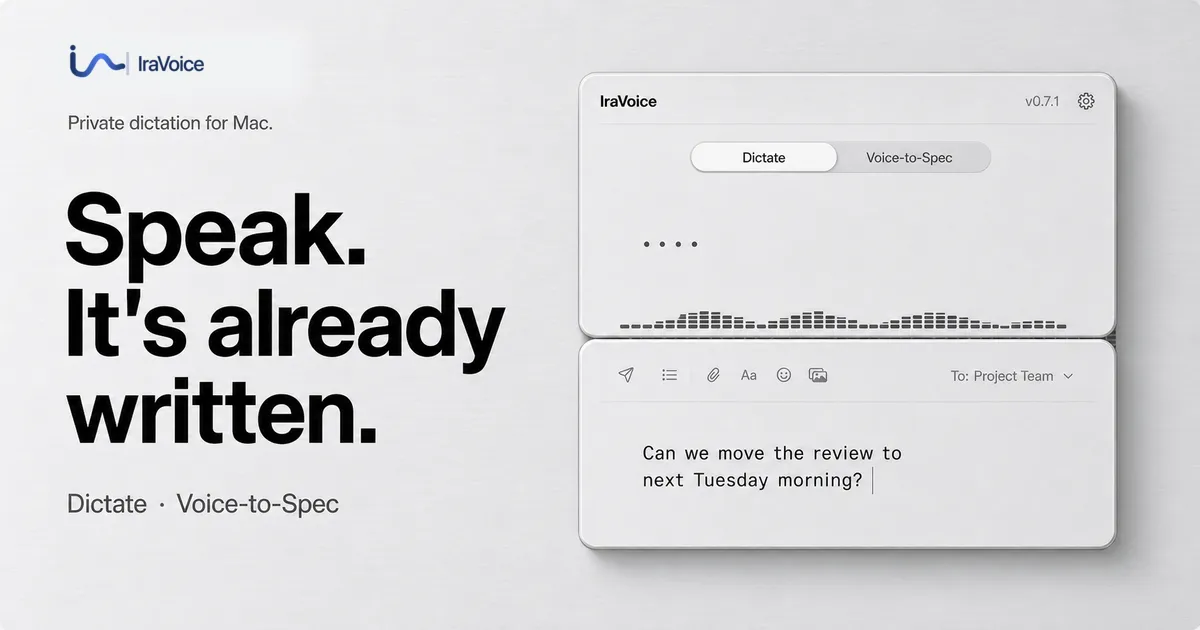
Dual Workflow Shortcuts – Two keyboard shortcuts define the product's core interaction. Holding the Right Option key triggers standard dictation: the user speaks naturally, filler words are stripped, and the polished text lands directly at the cursor in any focused text field. Holding the Globe key activates Voice-to-Spec, a specialized mode that converts spoken requirements into structured Markdown suitable for agent handoffs or developer briefs.
Voice-to-Spec for Developers – The Globe shortcut distinguishes IraVoice from typical dictation tools. Users can articulate rough technical thoughts, and the app formats them into a reusable Markdown specification. This output can be reviewed and pasted manually, or sent directly to AI coding agents like Codex or Claude Code through an explicit, fail-closed Terminal session. Only the finished text is shared, not the audio.
Privacy-First Architecture – IraVoice operates without product telemetry, cloud transcript history, or account-based features. License state is stored in the Mac Keychain. The only external connections are the initial model download and a one-time license key verification via Gumroad. The product also publishes a comprehensive privacy matrix comparing 18 Mac dictation solutions across 33 source-backed criteria, allowing users to audit claims independently.
Published Benchmarking – The team provides transparent evidence for performance claims. A published benchmark study on a disclosed Mac shows a Word Error Rate (WER) of 1.98% using Apple SpeechAnalyzer and 4.28% using whisper.cpp small.en. The study includes raw clip outputs, checksums, and a public verifier, though the company acknowledges the test is not a universal ranking. Similarly, the privacy matrix is sourced from first-party documents and cited explicitly.
One-Time Purchase Pricing – Unlike nearly every competitor, IraVoice charges a flat $50 for perpetual access. A three-day full trial requires no credit card, and a 30-day refund guarantee is provided through Gumroad. The purchase covers both dictation workflows with no subscription tiers or feature gating.
How It Works
After downloading the notarized DMG and dragging IraVoice to the Applications folder, users grant Microphone and Accessibility permissions. Speech models download automatically on first use. Daily operation centers on two keyboard shortcuts: Right Option for dictation and Globe for Voice-to-Spec. For dictation, the user holds Right Option, speaks naturally, and releases; the processed text appears at the cursor in the active application. For Voice-to-Spec, the user holds Globe, outlines a concept verbally, and receives structured Markdown that can be edited or dispatched to a coding agent. The app runs as a background service accessible from any text field, and the listening visualizer provides real-time audio level feedback. No account registration or manual uploads are required; the trial runs unhindered for 72 hours, after which features pause until a license key is pasted from the Gumroad receipt.
Use Cases
Personal Writing and Note-Taking – A freelance blogger drafts articles by dictating into a text editor. IraVoice removes filler words and formats punctuation, producing clean copy without manual cleanup. The on-device processing ensures drafts remain confidential, which is critical for unreleased content.
Developer Specification Generation – A software architect holds the Globe key to verbally outline a new feature during a walk. IraVoice converts the spoken requirements into a Markdown specification that can be reviewed, refined, and pasted into a project management tool or handed off to an AI coding agent for implementation.
Privacy-Conscious Business Communications – A legal consultant uses dictation to draft correspondence while traveling. Because no audio or text leaves the Mac, client confidentiality is maintained. The one-time payment model avoids recurring software costs for the firm.
Accessibility Support – A user with repetitive strain injuries relies on the Right Option shortcut to dictate emails, documents, and messages. The low-latency local processing keeps the workflow fluid, and the customizable shortcuts minimize physical strain.
Pricing & Value
IraVoice offers a single, transparent pricing structure: a one-time payment of $50. A three-day free trial with full feature access requires no credit card, allowing extensive evaluation. After the trial, dictation pauses until a license key from Gumroad is activated. The purchase includes a 30-day refund guarantee. There are no subscription tiers, upsells, or pro features locked behind higher payments. Compared to subscription-based dictation services that cost $10–30 per month, IraVoice's lifetime access is cost-effective within about two to five months of use. Check out their pricing details for the full breakdown. The only additional cost is the requirement of an Apple-silicon Mac running macOS 26 or later.
Frequently Asked Questions
Does IraVoice need an internet connection? No. Speech recognition and formatting run entirely on-device. An internet connection is only required for the initial model download and license key verification. After setup, dictation works offline.
Which Macs are supported? IraVoice 0.7.2 requires an Apple-silicon Mac (M1 or later) running macOS 26 or newer. Apple Intelligence must be enabled for polished formatting, but basic unformatted dictation can fall back when Apple Intelligence is unavailable.
Can I try IraVoice before buying? Yes. A three-day full trial is available with no credit card required. All features are unlocked during the trial period. After three days, voice actions pause until a license key is entered.
How does Voice-to-Spec work with AI agents? Voice-to-Spec can send structured Markdown to Codex or Claude Code through a visible Terminal session. The user explicitly chooses the destination, and only the finished specification is shared—no audio or intermediate data leaves the Mac. The agent's own privacy terms then apply.
Does IraVoice store my audio or transcripts? No. IraVoice has no server infrastructure to receive or store audio, transcripts, or user data. License state is stored in the Mac Keychain, and no telemetry or usage logs are collected by the app. Review the privacy promise for full details.
Final Verdict
IraVoice delivers a compelling privacy-first dictation experience tailored to the modern Mac ecosystem. Its on-device processing, transparent benchmarking, and one-time pricing model address market gaps left by subscription-based cloud services. The Voice-to-Spec workflow is a genuine innovation for developers and technical writers who need structured output from casual speech. However, the strict hardware requirement (Apple-silicon and macOS 26) limits accessibility for users on older machines or Intel Macs. Additionally, the absence of cloud sync or cross-device support may frustrate those who work across multiple computers. Ultimately, IraVoice is an excellent choice for anyone who prioritizes privacy, prefers a perpetual license, and owns a compatible Mac. Developers, writers, and privacy-conscious professionals will find the two-shortcut workflow both refreshing and effective. Explore the developer-focused dictation features to see how Voice-to-Spec could fit into a technical workflow.
Pros & Cons
Pros
- On-device speech recognition ensures audio never leaves the Mac, eliminating privacy risks associated with cloud dictation services.
- The Voice-to-Spec workflow converts spoken ideas into structured Markdown, offering a unique bridge between dictation and developer agent handoffs.
- A one-time $50 purchase replaces recurring subscriptions, making IraVoice cost-effective for long-term use without feature gating.
- Published benchmarks with disclosed methodology and raw results allow users to independently verify recognition accuracy claims.
- The three-day free trial with no credit card requirement enables risk-free evaluation of all features before any financial commitment.
Cons
- Requires an Apple-silicon Mac running macOS 26 or later, excluding Intel Mac users and those on older operating systems from using the application.
- No cross-device or cloud sync functionality means dictation history and settings are confined to a single machine, limiting multi-device workflows.
- The absence of product telemetry—while beneficial for privacy—means the developer receives limited usage data to guide future improvements or bug detection.